
Summary
Editor's rating
Is it worth the money compared to alternatives?
Big screen, fairly modern look, but not premium
Build quality, weather resistance, and long-term feel
Video, audio, and app: how it behaves day to day
What you actually get in the box and what it can do
How well the security and unlocking functions really work
Pros
- Very complete: 5 unlock methods (fingerprint, RFID, PIN, app, monitor) plus 12V lock control
- Large 10-inch wired monitor with clear 1080p video and decent night vision
- Good value for money if you actually need a small access control system instead of just a doorbell
Cons
- Setup requires wiring and some patience; not very plug-and-play
- Interface and app feel a bit rough compared to big-brand smart doorbells
- Limited compatibility with other brands’ intercoms or cameras

Specifications
View full product page →| Brand | ANJIELO SMART |
A full-on smart intercom that tries to do everything
I’ve been using this ANJIELO SMART video door phone for a little while now, and the first thing to know is: this thing is loaded with features. It’s not just a doorbell with a camera. You get a big 10-inch touch monitor inside, a 1080p camera outside, fingerprint reader, RFID cards, PIN code, app control with Tuya, and it can drive an electromagnetic lock. On paper, it basically replaces a classic intercom, a smart doorbell, and an access control system in one box.
In day-to-day use, my feeling is that it’s clearly made for people who don’t mind running cables and messing a bit with settings. It’s not as plug-and-play as a simple wireless doorbell. You need to wire the outdoor unit to the indoor monitor, connect power, and ideally have a bit of patience with the Tuya app. Once it’s in place though, it does the job: you see who’s at the door, you can talk, and you can unlock remotely.
Compared to basic Wi‑Fi doorbells like some cheap no-name models, the big difference here is the wired connection between monitor and doorbell and the lock control. There’s less lag on the video inside the house since it’s not relying only on Wi‑Fi, and you don’t depend on a phone to answer – the monitor rings like a classic intercom. For families or small offices, that’s pretty handy. Everyone hears it, not just the person with the smartphone.
It’s not perfect though. Some parts feel a bit “DIY kit” rather than polished consumer gadget. The manual could be clearer, the app integration isn’t always smooth, and you need to be comfortable with basic wiring. If you’re looking for something you just screw in and forget, this might feel a bit overkill. But if you actually want an access system with fingerprints, cards and remote unlock, it’s one of the more complete options in this price range.
Is it worth the money compared to alternatives?
For what it offers, I’d say the value for money is pretty good, as long as you actually plan to use the advanced functions. You’re getting a large 10-inch monitor, a 1080p outdoor camera with night vision, fingerprint reader, RFID, keypad, app integration, motion recording with a 32 GB card, and control for a 12V lock. Buying all that separately from big brands would cost you a lot more. Here, it’s bundled in one kit that’s not crazy expensive compared to the intercom market.
Where the price makes sense is if you want a semi-complete access control system: for example, for a gate, a small apartment building with a couple of flats, or a home where you really want keyless entry for everyone. In that use case, the kit gives you most of what you need without having to mix brands and systems. If you only want a simple video doorbell with notifications on your phone, honestly, there are cheaper and simpler options like basic Wi‑Fi doorbells that will be less of a headache to install.
Compared to something like a Ring or Nest doorbell, this ANJIELO SMART kit is less polished but more versatile on the lock and access side. Those big brands are easier to set up, better integrated with ecosystems, and sometimes offer cloud recording, but they usually don’t control a proper 12V electromagnetic lock with multiple access methods like fingerprint and RFID. Here, you trade some user-friendliness and design for more control and fewer subscriptions.
If you’re not afraid of a bit of DIY and you actually need the fingerprint + card + PIN combo, I think the price is justified and even attractive. If you’re the type who hates wiring and just wants something that works straight out of the box with minimal menus, you might end up annoyed and feel you overpaid for features you don’t use. So for me, good value, but only for the right profile of user.
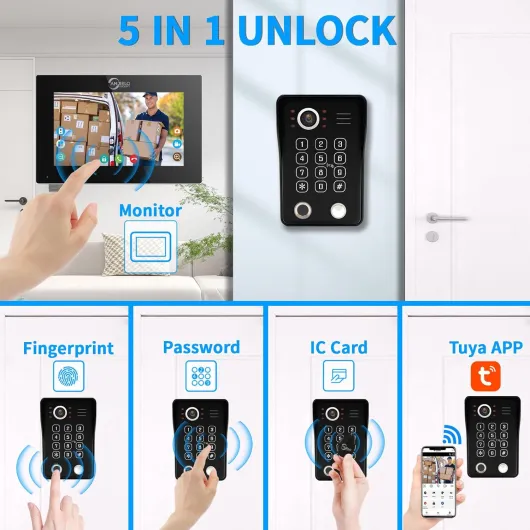
Big screen, fairly modern look, but not premium
Design-wise, the first thing you notice is the size of the monitor. Ten inches on a wall is big. In my case, it ends up looking a bit like a wall-mounted tablet. The bezels are not the thinnest in the world, but they’re acceptable for this type of product. It doesn’t scream luxury, but it doesn’t look cheap plastic junk either. Once it’s on the wall, it blends in fine in a hallway or near the front door, especially if you don’t have a super high-end interior.
The touch screen is responsive enough. It’s not smartphone-level smooth, but you’re not gaming on it, you’re just navigating menus and answering calls. The icons are clear and big enough to use without poking three times. The interface looks a bit old-school Android style, but it’s functional. In low light, the brightness is okay; you can still see visitors clearly from the live view.
The outdoor unit is more compact and looks a bit more “industrial”. It has the camera at the top, the fingerprint sensor, keypad, and card reader. The supplied waterproof cover is useful if your entrance is exposed to rain. It’s not super stylish, but it looks robust enough to handle some rough weather and occasional knocks. The buttons are firm, and the fingerprint area is clearly marked, so guests don’t get lost.
If I compare it to something like a Nest Doorbell or Ring, you can see this is not in the same design league. Those are more polished and discreet. Here, it’s more functional than pretty. Personally, I’m fine with that for a gate or a building entrance, less so for a very design-focused front door. But in practice, after a few days, you stop noticing it, and the big monitor actually becomes quite handy when someone rings – you see faces clearly without squinting.
Build quality, weather resistance, and long-term feel
On the build quality side, both units feel reasonably solid for the price, but don’t expect high-end metal everywhere. The indoor monitor is mostly plastic, with a glass or glass-like front for the screen. Once it’s mounted on the wall, it doesn’t flex or creak, and the touch panel has held up fine to daily use. It’s not something you’ll be constantly handling like a phone, so I’m not too worried about wear on the screen, as long as you don’t scratch it with keys or tools.
The outdoor station is where durability really matters. The casing feels sturdy enough, and the waterproof cover is a good addition if your door is exposed. I’ve had it go through rain and some temperature changes without seeing any condensation or malfunction. The buttons and fingerprint sensor still work normally after several weeks outside. The manufacturer claims it’s waterproof and dustproof; I wouldn’t go as far as to drown it, but it seems fine for typical outdoor conditions.
Because it’s a wired system with an external 12V lock, the most fragile parts are honestly the cables and the way you install them. If you do a clean job with proper conduits and protect the wires from being yanked, it should last. If you just run bare cable along a fence or wall where people can pull or cut it, that’s obviously a weak point. Same thing for the electromagnetic lock: it depends heavily on how it’s fitted and the quality of the door or gate.
In terms of long-term confidence, I’d call it decent but not bulletproof. It’s clearly made in China, and while that’s not automatically a problem, it doesn’t give the same feeling of robustness as some more expensive European or big-brand systems. That said, for a home or small business where it won’t be abused daily by dozens of people, I think it will hold up if you install it properly and don’t smash the outdoor unit. The fact that it uses standard 12V locks is also a plus: if the lock dies one day, you can replace it without throwing away the whole system.
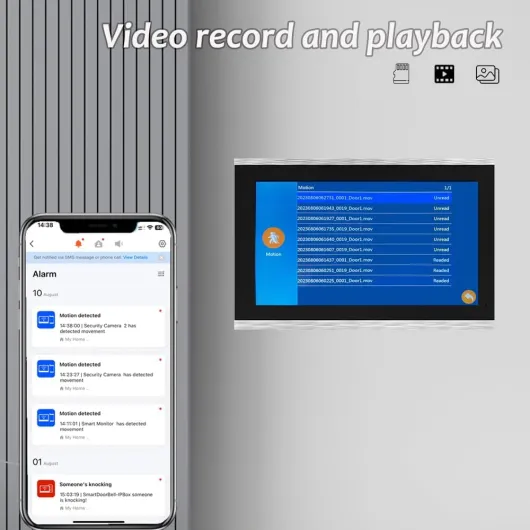
Video, audio, and app: how it behaves day to day
On the video side, the 1080p camera does a decent job. During the day, the image is sharp enough to clearly recognize faces and even read small text on delivery packages if they hold it up. The 148° wide angle means you see a good chunk of the area in front of the door, sometimes even a bit too wide with some lens distortion on the sides, but nothing dramatic. At night, the infrared kicks in; it’s more of a black-and-white style image, but you can still recognize people and see what’s going on up to several meters away, which is what you need from this kind of device.
Audio quality is okay but not perfect. From the monitor to the door, your voice is clear enough, but you can sometimes get a bit of echo or background noise if there’s wind outside. It’s usable, you can have a short conversation with the delivery guy without issues, but don’t expect studio quality. Volume on the indoor unit is loud enough to hear the ring from another room, and you can adjust it in the settings. The two-way audio on the phone via the Tuya app works, but there can be a small delay depending on your Wi‑Fi and mobile signal.
For motion detection and recording, it’s fairly straightforward: when motion is detected or someone rings, it records video or snapshots to the microSD card. You can review clips from the monitor or the app. Motion sensitivity can be a bit touchy: at first, I had too many triggers from cars passing by or people walking on the sidewalk. You’ll likely need to tweak the settings and camera angle to avoid constant alerts. It’s not as smart as big brand systems that filter people vs cars vs animals.
General reliability has been decent. The wired connection between the camera and monitor means you don’t get random disconnections like with fully wireless doorbells. The only times I had issues were with the Tuya app not connecting instantly or needing a refresh to show the live video. It’s annoying but not a deal-breaker. If you mainly use the wall monitor and only occasionally the phone, it’s fine. If you want to use it almost only through the app, you might get a bit frustrated by the occasional lag.
What you actually get in the box and what it can do
When you unpack the ANJIELO SMART kit, you get the indoor 10-inch touch monitor, the outdoor doorbell/camera unit with fingerprint reader, a power supply for the monitor, some 4-core cable (about 3 m for basic installation), RFID cards (5 passes in my kit), and the usual screws and brackets. It’s not a tiny gadget; the monitor is about 27 x 18 cm, so it takes noticeable wall space, more like a small tablet fixed to the wall than a classic chime.
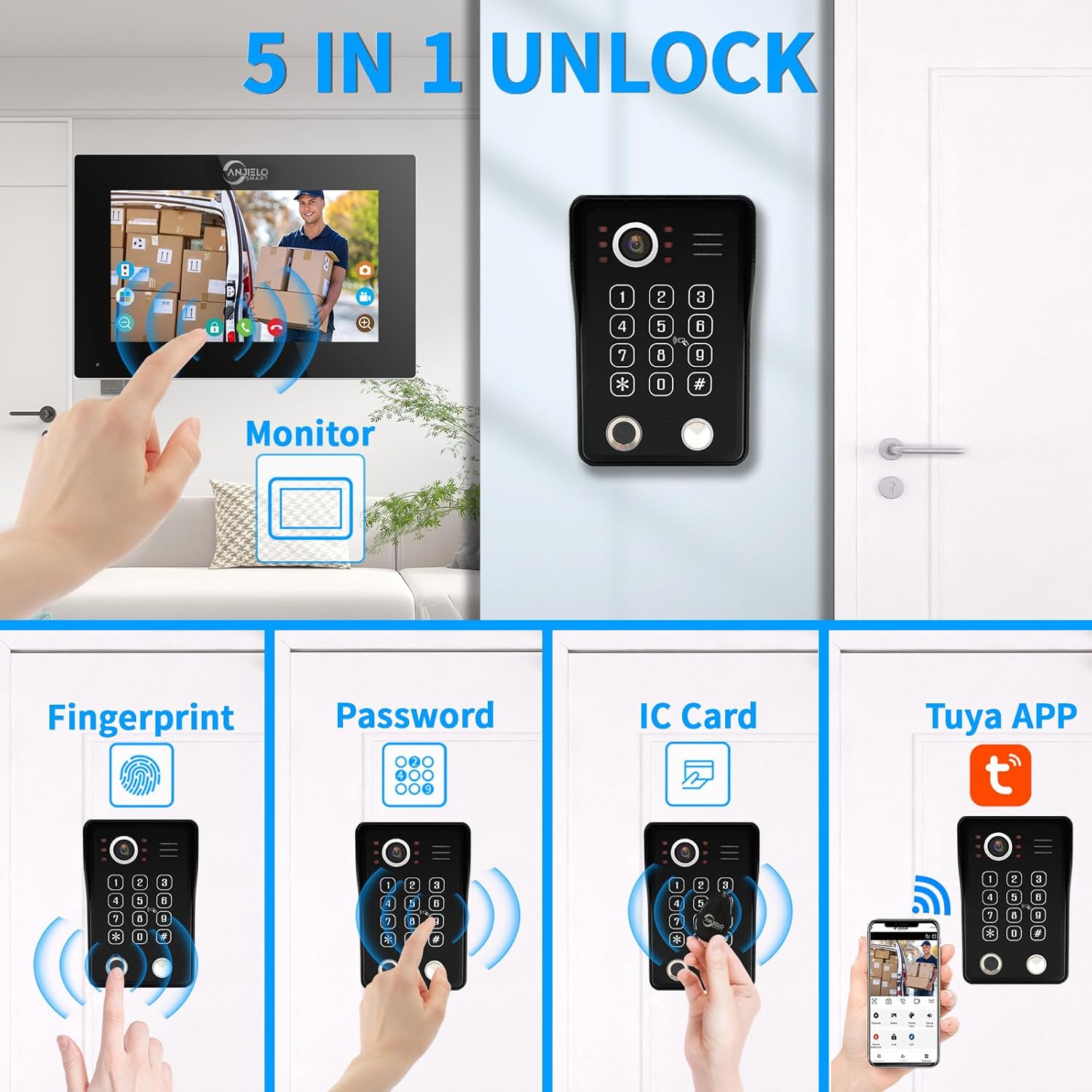
Function-wise, it’s pretty stacked. You have 5 unlock methods: PIN code, fingerprint, RFID card, Tuya app, and via the indoor monitor. The system can control a 12V electronic or electromagnetic lock, which is the whole point if you want keyless entry. The camera is 1080p with a 148° wide-angle lens, infrared night vision, motion detection, and it records to a microSD card (a 32 GB card is usually included). When someone rings, all monitors and phones ring, and you can answer from any of them.
The main catch is compatibility: the brand clearly says it’s designed to work with its own system, and they don’t guarantee it will play nice with other intercoms or cameras. So if you were hoping to mix this with another brand’s monitor or reuse an existing camera, that’s risky. It’s basically a closed kit: use it as-is, or prepare for some tinkering and maybe a chat with their support.
Overall, in terms of features vs price, I’d say it’s pretty solid on paper. You don’t often get fingerprint + RFID + app + wired monitor at this price point. But that also means there are more things that can be confusing or go wrong during setup. If you just want a simple video doorbell, you might find this overcomplicated. If you want a small access control system for a gate or building entrance, it starts to make more sense.
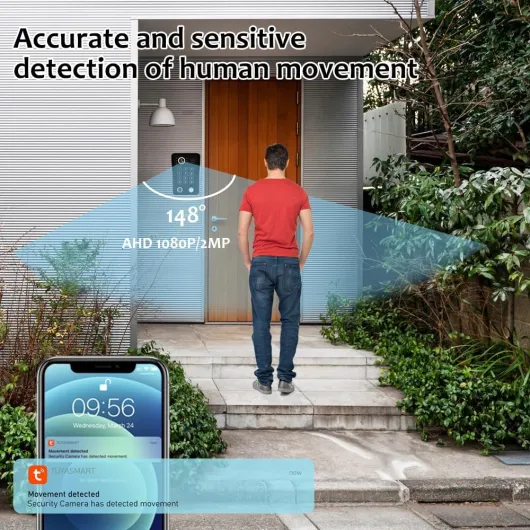
How well the security and unlocking functions really work
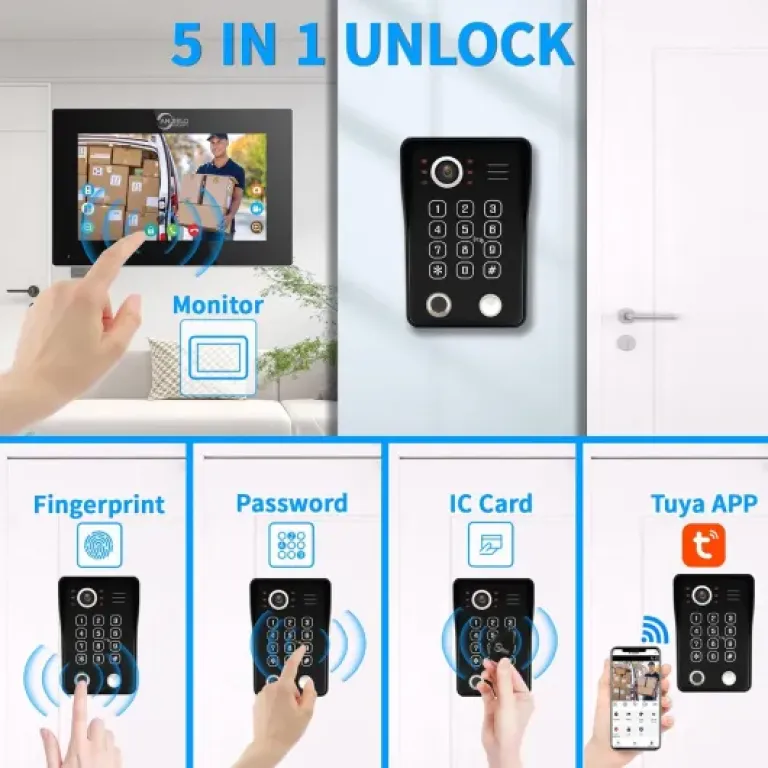
The big selling point here is the 5-in-1 unlocking: fingerprint, RFID card, PIN code, app, and monitor. In practice, this is where the system is actually pretty useful. I registered several fingerprints (mine, partner’s, and a couple of family members), and after a few tries, the sensor recognizes them quite reliably. It’s not as fast as a modern smartphone fingerprint sensor, but it’s fast enough: you put your finger, there’s a short pause, and the door unlocks. I had maybe one or two failed reads out of ten when my fingers were wet or dirty.
The RFID cards work fine and are handy for kids or older people who don’t want to mess with a code or phone. You just present the card, it beeps, and unlocks. The PIN code option is also practical for giving temporary access, for example to a cleaner or a delivery person you trust. Just remember to change the code regularly if you share it. All of these methods are configured from the monitor, which is a bit clunky at first, but once you’ve done it once or twice, it’s manageable.
Using the Tuya app to unlock is nice when you’re not at home. You get a notification, open the video, talk to the person, and if needed, you tap to unlock. There’s a small delay, so don’t expect instant reaction like in spy movies, but it works. This is especially useful if you have a gate or a main entrance and want to let someone in without giving them a key. Just keep in mind that all this depends on your internet connection; if your Wi‑Fi or mobile data is down, remote unlocking is obviously not available.
Overall, as a security/access control system, I’d say it’s effective enough for home or small office use. It’s not a professional-grade system with advanced logs and cloud backups, but you can clearly control who comes in and when. The combination of video, audio, and multiple unlock methods is practical. The main limit is that the interface isn’t super polished, and you need to be a bit patient to configure everything. If you want something your grandparents can set up alone, this might be too much. If you’re okay spending an afternoon wiring and configuring, it gives you a lot of control for the price.
Pros
- Very complete: 5 unlock methods (fingerprint, RFID, PIN, app, monitor) plus 12V lock control
- Large 10-inch wired monitor with clear 1080p video and decent night vision
- Good value for money if you actually need a small access control system instead of just a doorbell
Cons
- Setup requires wiring and some patience; not very plug-and-play
- Interface and app feel a bit rough compared to big-brand smart doorbells
- Limited compatibility with other brands’ intercoms or cameras
Conclusion
Editor's rating
Overall, this ANJIELO SMART video door phone is a feature-packed wired intercom that does a lot for the money, but it clearly isn’t for everyone. If you want a full access system with fingerprint, RFID cards, PIN code, app control, and a big indoor screen to see and talk to visitors, it delivers. The video quality is decent, the night vision does its job, and the multiple unlock methods are genuinely practical in everyday life. As long as your internet and Wi‑Fi are okay, the Tuya app adds convenient remote access to let people in when you’re away.
On the flip side, it’s not a super polished, plug-and-play product. The design is more functional than stylish, the interface feels a bit old-school, and the setup requires some wiring and patience. Compatibility is limited to the brand’s own ecosystem, and the app can sometimes lag. So if you’re just after a simple smart doorbell, this is probably overkill and not the easiest path. But if you’re looking for an affordable way to equip a home entrance, gate, or small office with a real access control system (with 12V lock control and several identification methods), it’s a solid option.
I’d recommend it to people who are comfortable with basic electrical work, landlords who want a more controlled entrance, or anyone tired of managing physical keys. If you hate dealing with cables, menus, and apps that need tweaking, you should probably look at a simpler, more mainstream video doorbell instead, even if it gives you fewer options for unlocking.