
Summary
Editor's rating
Value for money: good if you hate subscriptions and accept some compromises
Simple, compact design that doesn’t scream “security camera”
Battery life: decent if you tweak the settings
Weather resistance and build: light plastic but holds up
Video, motion detection and app: usable, but with quirks
What you actually get with the Defender Video Doorbell
Pros
- No subscription required and 32 GB SD card included for local storage
- Good 1080p video quality and usable night vision for everyday monitoring
- Includes a plug-in chime and has decent weather resistance (IP65/IP66)
Cons
- App experience is clunky, with awkward clip navigation and sometimes laggy connections
- Motion recording can start late or split events, which reduces reliability for security use

Specifications
View full product page →| Brand | Defender |
A doorbell camera that doesn’t lock you into a subscription
I picked up the Defender Video Doorbell mainly because I was tired of paying monthly fees for cloud storage on my old doorbell. The promise here is simple: 1080p video, motion alerts, two-way audio, included chime and SD card, and no subscription. On paper, it ticks most of the boxes for a basic home security setup without ongoing costs.
After installing it and using it for a while, I’d say it’s a mixed bag, but generally usable. It does the core job: I can see who’s at the door, talk to them, and check recordings later. Video quality is decent, night vision works, and the chime is handy if you don’t want to rely only on your phone. So the basics are there.
Where it starts to feel a bit rough is on the software and connection side. The doorbell runs through the Tuya app, and while setup wasn’t a nightmare, it’s not the smoothest thing I’ve used. Also, if your Wi‑Fi is even slightly flaky, you’ll feel it: notifications can lag, and recordings sometimes start a bit late when someone walks past quickly. It’s not unusable, but it’s not polished either.
Overall, this feels like a product aimed at people who want simple, local storage and no recurring payments, and who are ready to accept some quirks. If you’re expecting the slickness of the big-name brands with perfect apps and super fast notifications, you’ll probably be annoyed. If you just want a solid camera on the door with no subscription, it’s honestly okay for the price, with some clear trade-offs.
Value for money: good if you hate subscriptions and accept some compromises
When you look at what you get for the price – 1080p doorbell camera, plug-in chime, 32 GB SD card, no subscription – the value is actually pretty solid. A lot of bigger brands hit you with a lower upfront cost and then lock key features (like viewing older recordings) behind a monthly fee. Here, you pay once and that’s it. For people who really don’t want ongoing costs, that’s probably the main selling point, and it genuinely makes this doorbell interesting.
The trade-off is mostly on the software and polish. The Tuya app works, but it’s nowhere near as smooth as the dedicated apps from the big doorbell brands. Things like clip navigation, downloading, and sometimes notifications feel a bit clunky. Also, the motion detection behaviour – sometimes starting late or splitting events – is the kind of thing you see more often on lower-cost hardware. If you’re coming from a premium ecosystem, you’ll definitely notice the difference.
On the other hand, if you compare this to other budget or mid-range video doorbells that also rely on SD card storage, Defender at least has a few strong points: the security certifications (IASME Cyber Assurance and Secured by Design), a proper included chime, and a decent build with IP65/IP66 rating. The Amazon rating around 3.9/5 pretty much matches my feeling: it’s not flawless, but it does what it says as long as you’re okay with a few annoyances.
So in terms of value, I’d say: good deal for practical users who want local storage and no fees, and who don’t mind a less polished app and some occasional connection quirks. If you want a super slick experience and never want to fiddle with settings, you might prefer to spend more on a big-name brand with cloud storage and a more refined app, even if it costs you a subscription over time.
Simple, compact design that doesn’t scream “security camera”
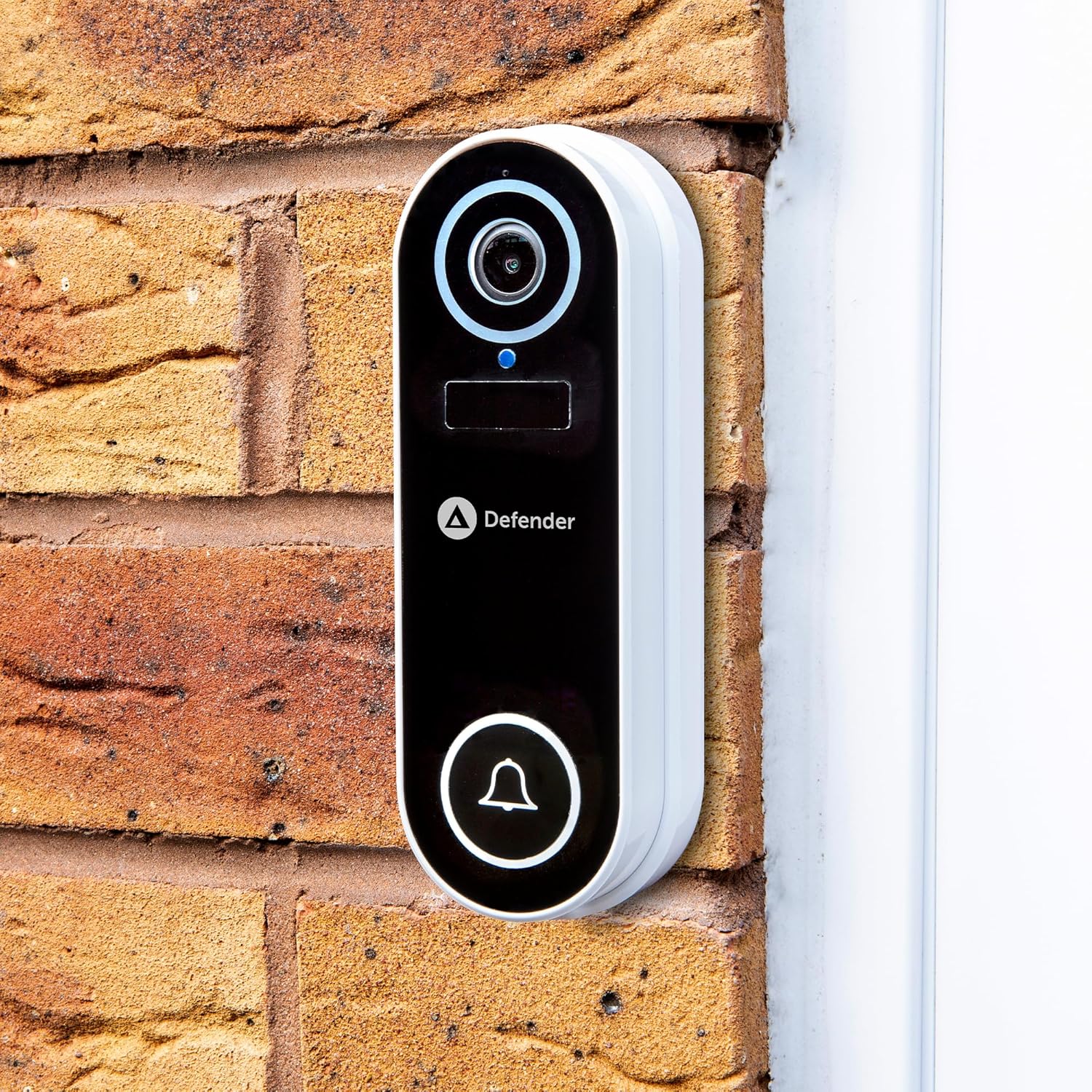
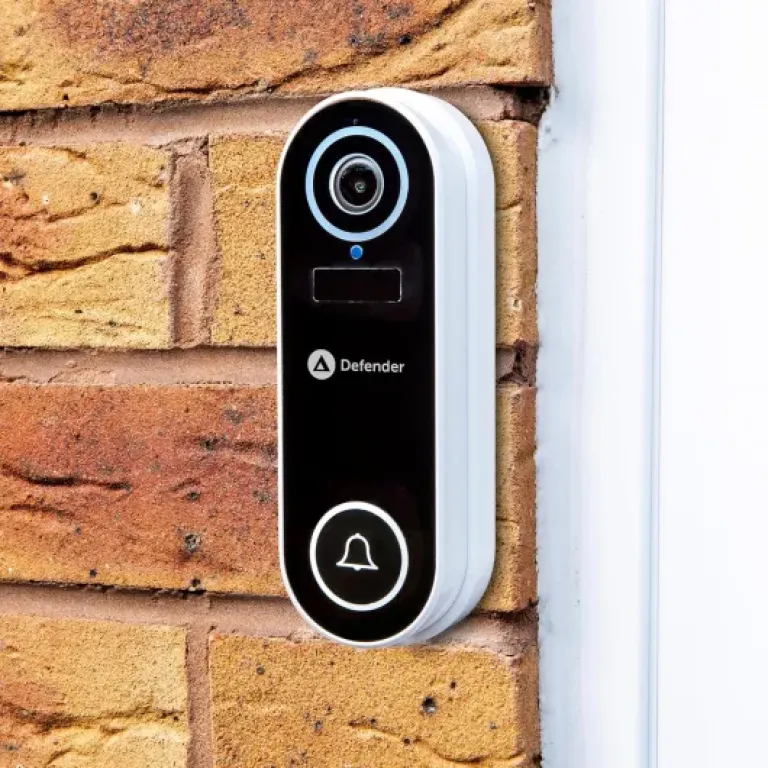
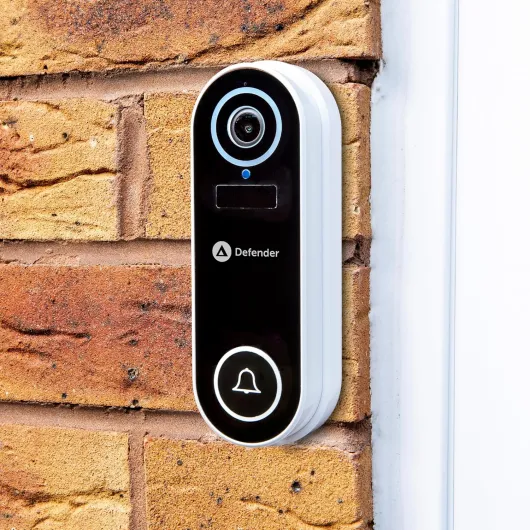
Design-wise, the Defender doorbell is pretty minimal and compact. The dimensions are around 25 x 45 x 135 mm, so it’s a slim vertical unit. It’s white plastic with a camera at the top, a button at the bottom, and that’s basically it. It doesn’t look premium, but it also doesn’t look cheap to the point of being embarrassing on your front door. I’d call it clean and basic, which is fine for a budget-friendly product.
The 120° viewing angle is a decent compromise. It’s wide enough to cover most front doors and a bit of the surrounding area without giving you that weird fish-eye distortion that some wider lenses have. In practice, I can see people from head to at least mid-torso when they stand at a normal distance from the door, and I still catch people walking past on the path. If you have a very wide porch or a door that’s set back in a corner, you’ll want to pay attention to where you mount it, but for a regular house entrance it does the job.
Buttons and indicators are straightforward. The ring button is large enough that visitors know where to press, and there’s a small LED that shows when it’s active or charging. The back has the mounting system, which supports both screw-in mounting and self-adhesive. Personally, I’d use screws if it’s outdoors – adhesive on exterior walls tends to fail over time, especially with rain and temperature changes. The unit is light, so it’s not hard to handle during installation.
Overall, the design is functional rather than stylish. If you want a doorbell that matches some fancy black metal hardware or blends into a dark door frame, the all-white plastic might look a bit out of place. But if you care more about having a small, neutral device that doesn’t draw too much attention, this one is fine. It looks like what it is: a budget smart doorbell that focuses more on features and price than on design flair.
Battery life: decent if you tweak the settings
The doorbell runs on a rechargeable battery that you top up via USB (5V, 1W). The brand claims up to 6 months of battery life, which is technically possible but only under light use: low motion sensitivity, not many alerts per day, and not constantly checking the live view. In a normal household with a few visitors, some deliveries, and occasional motion triggers, I’d expect something more like 2–4 months between charges, depending on how busy your front door is.
One thing that’s worth doing is spending time in the app to tune the motion detection. If you leave it on very sensitive settings, every car, cat, or shadow can trigger an event, and the battery drains faster. If you narrow down the detection zones and stick to human detection where possible, the notifications are more relevant and the battery lasts longer. This is one of those products where a bit of setup time really impacts day-to-day use.
Charging itself is straightforward: you plug in the included USB cable. The downside is that, unless you have a very accessible mounting spot, you might have to take the whole doorbell off the wall to charge it indoors. There’s no removable battery pack, so you can’t just swap a spare. While it’s charging, you obviously don’t have a doorbell camera on the wall. For some people that’s not a big deal if it’s only a few times a year; for others, it might be annoying enough to consider wiring or another solution.
One Amazon review mentioned no low-battery notification despite the setting being enabled. I did see that the app has battery indicators, but I wouldn’t rely 100% on getting a timely push notification every time. It’s safer to check the battery level in the app now and then. In short, battery life is good but not magic: it’s fine if you manage motion settings and accept that you’ll need to charge it a few times a year, but it’s not a set-and-forget device forever.
Weather resistance and build: light plastic but holds up
In terms of build, the Defender doorbell is made from ABS plastic, which keeps it light and fairly sturdy for everyday use. It doesn’t feel premium in the hand, but once it’s on the wall you’re not really touching it apart from the button. The plastic casing is tight, and there are no obvious gaps or rattling parts. It’s clearly not a high-end metal unit, but it doesn’t feel like it will fall apart at the first sign of bad weather either.
The device is rated IP65/IP66, meaning it can handle rain, dust and general outdoor exposure. In practice, I’ve had it in typical UK-style weather – rain, wind, cold nights – and it has kept working without water ingress or fogging on the lens. I’d still recommend mounting it under some kind of small overhang if you can, just to reduce direct exposure to heavy rain, but it’s built to be outdoors. The water repellence seems solid enough for normal front-door use, not some delicate indoor gadget pretending to be weatherproof.
Because it’s battery powered and wall-mounted, the main risk is more about theft or tampering than physical failure. It’s not super heavy-duty, so if someone really wanted to rip it off the wall, they probably could. That’s kind of standard for this category though. Using the screw mount instead of just adhesive helps a lot with it staying where it should, especially over months and through temperature swings.
Over time, the main wear points will likely be the battery life slowly degrading and possible yellowing of the white plastic from UV exposure. That’s normal for most plastic outdoor devices. Given the price range, I’d expect this to last a few years without major issues, assuming you don’t knock it off the wall or drown it with a pressure washer. So, durability-wise, it’s perfectly acceptable for a budget wireless doorbell, just don’t expect tank-like construction.
Video, motion detection and app: usable, but with quirks
On the performance side, the 1080p video is good enough for normal home use. Faces are clear at typical door distances, you can read packages or logos on jackets most of the time, and the image doesn’t look muddy. It’s not super sharp like some 2K or 4K cameras, but for checking who rang or who walked past, it’s totally fine. The night vision does its job too: the infrared LEDs give you a clear black-and-white image out to a few metres. You won’t get cinematic quality, but you can see people clearly at the door in the dark.
Motion detection is where things get a bit inconsistent. You do get human motion detection with adjustable zones, which in theory helps cut down on false alerts from cars or branches. In practice, I noticed that recordings can start a bit late, especially when someone is just walking quickly past the field of view. You sometimes end up with the back of the person instead of them approaching. Also, for longer movement (like someone pacing or delivering a package), it sometimes stops recording mid-way and then starts a new clip later. This matches what one of the negative reviews mentioned, and I’ve seen similar behaviour. It’s not constant, but it happens enough to be mildly annoying.
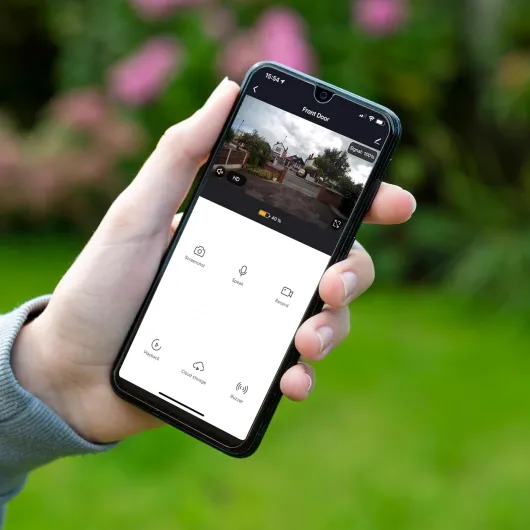
The Tuya app is functional but not polished. Live view works, you can talk through the two-way audio, and you can browse recordings on the SD card. The problem is navigation: instead of a neat list of clips, you often end up scrubbing through a timeline to find the right moment, which is clunky. Downloading specific clips is possible but not as straightforward as it should be. Also, connection stability can vary – if your Wi‑Fi isn’t solid near the door, you’ll run into lag, buffering, or the device reconnecting more often than you’d like.
Overall, I’d say performance is good enough for casual home monitoring, but not ideal if you need rock-solid reliability or super precise motion capture. It does the job of showing you who’s at the door and giving you a history of events, but if you’re picky about app experience and recording reliability, you’ll notice the rough edges. For the price and the no-subscription model, it’s acceptable, but it’s clearly a step down from the smoother big-brand ecosystems.
What you actually get with the Defender Video Doorbell
Out of the box, the package is pretty straightforward. You get the doorbell unit, a plug-in chime, a 32 GB microSD card already included, mounting bracket, screws and wall plugs, a USB cable for charging, and even a little warning sticker to say you’ve got CCTV. No base station, no extra hub – it connects straight to your 2.4 GHz Wi‑Fi and is controlled through the Tuya app. So hardware-wise, it’s quite simple.
The main specs: 1080p video, 120° viewing angle, night vision up to about 10 metres, two-way audio, and battery-powered with USB charging. The brand claims the battery lasts up to 6 months. In reality, that depends a lot on how busy your front door is and how aggressive your motion settings are. It’s rated IP65/IP66 (basically good enough for rain and general outdoor use) and the body is ABS plastic, so it’s light and doesn’t feel fragile, but it’s not heavy-duty metal either.
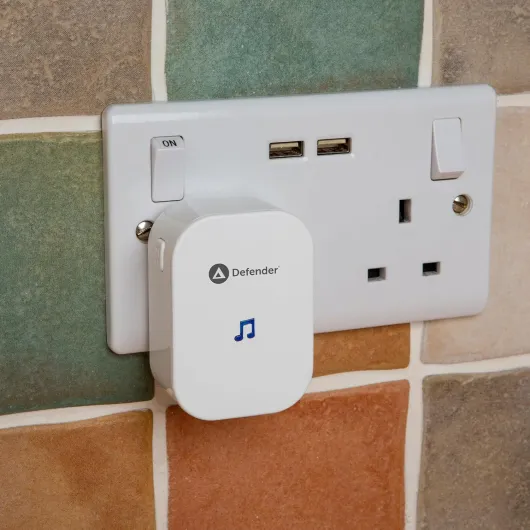
The chime plugs into any wall socket and pairs with the doorbell, so if your phone is in another room or on silent, you still hear when someone rings. That’s actually a big plus compared to some cheap cameras that only send phone notifications. The no-subscription angle is also real: the SD card handles all the storage, and you can review clips from the app without any paywall. For people who hate monthly fees, that’s honestly one of the main reasons to consider this thing.
In terms of positioning, I’d say this sits in the budget to mid-range bracket. It’s not as slick or feature-loaded as higher-end models from the big brands, but it gives you the essentials: live view, recording, motion alerts, and two-way talk. The pitch is basically: pay once, use local storage, deal with a slightly clunky app, but keep your data on your card and avoid subscriptions. If that’s the trade-off you’re okay with, then the overall package makes sense.
Pros
- No subscription required and 32 GB SD card included for local storage
- Good 1080p video quality and usable night vision for everyday monitoring
- Includes a plug-in chime and has decent weather resistance (IP65/IP66)
Cons
- App experience is clunky, with awkward clip navigation and sometimes laggy connections
- Motion recording can start late or split events, which reduces reliability for security use
Conclusion
Editor's rating
The Defender Video Doorbell is a practical option for people who mainly care about no subscription fees and local storage. It delivers the basics: 1080p video, usable night vision, two-way audio, motion alerts, and a plug-in chime. The included 32 GB SD card means you can review recordings without ever signing up for a cloud plan, which is a big plus if you’re trying to avoid ongoing costs. Build quality and weather resistance are decent for the price, and once mounted, it blends in well enough on most door frames.
Where it falls short is mostly on the software and overall polish. The Tuya app works but feels clunky, motion recordings can start a bit late or break into odd chunks, and connection stability depends heavily on having strong Wi‑Fi at the door. Battery life is fine if you tune the motion settings, but you’ll still need to take it down and recharge it every few months. None of these are deal-breakers if you accept you’re buying a budget-friendly, no-fee device, but they’re worth knowing before you commit.
I’d recommend this doorbell to budget-conscious users, renters, or homeowners who want a simple, subscription-free way to see who’s at the door and keep a basic video history. If you’re picky about app design, want flawless notifications, or need very reliable motion capture for security-critical situations, you’re better off paying more for a higher-end model with a stronger ecosystem. For everyday use, though, this Defender doorbell is decent value with clear pros and cons.