Summary
Editor's rating
Value for money: good deal if you accept the subscription trade‑offs
Design: small, discreet, and not trying to be fancy
Battery life vs marketing: depends heavily on how you use it
Durability and outdoor use: handles weather, but placement matters
Video, motion, and app performance: good enough with some quirks
What you actually get and how it works in real life
Pros
- Simple wireless setup with a central Sync Module that supports local USB storage
- Decent 1080p video quality and strong infrared night vision for typical home use
- Good price-to-features ratio compared to many Ring/Nest style competitors
Cons
- Two-year battery claim is optimistic in busy areas; heavy use drains batteries much faster
- Best features (person detection, smoother playback, thumbnails) locked behind a subscription
- Motion detection can be finicky at the edges and needs tuning to avoid false alerts
Specifications
View full product page →| Brand | Blink |
| Field of view | 143° diagonal |
| Camera resolution | 1080p HD video |
| Photo resolution | View captured images in 640 x 360 |
| Camera frame rate | Up to 30 fps |
| Size | 2.8 x 2.8 x 1.6 inches (70 x 70 x 41 mm) |
| Unit weight | 5.0 oz (141 g) |
| Power | Outdoor 4 battery: 2 AA 1.5V lithium metal batteries (non-rechargeable)Sync Module 2 power: 100-220V AC to 5V DC converter included.Battery life of up to two years, based on default settings. Battery life will vary based on device settings, use, and environmental factors. |
A wireless camera kit that mostly does what it says
I’ve been using Blink stuff on and off for a while, and this Outdoor 4 three‑camera kit is pretty much what I expected: a simple, mostly hassle‑free way to get eyes around the house without running cables everywhere. It’s not perfect, and some of the marketing (like the "two‑year battery") is a bit optimistic, but in day‑to‑day use it mostly gets the job done. If you want something you can stick on a wall and control from your phone without turning your house into a wiring project, this fits that brief.
The way I used it: one camera watching the driveway, one on the backyard, and one near the side gate. I set everything up through the Blink app, connected the Sync Module 2 to my router, and played with it both with the free cloud trial and then with just local storage on a USB stick. I also tested it with Alexa on an Echo Show to see how it behaved in a more “hands‑off” setup.
Overall, my feeling is this: the hardware is pretty solid for the price, but the whole experience is shaped by two things – where you place the Sync Module and cameras, and whether you pay for the subscription. If you mess up the placement or expect all the smart features for free, you’ll be annoyed. If you’re okay tweaking settings and possibly skipping the subscription, you can still have a decent system.
If you’re the kind of person who wants to take it out of the box, slap it on the wall, never touch a setting, and still get perfect alerts and two‑year batteries, you’re going to be disappointed. If you’re okay spending an evening experimenting with motion zones, sensitivity, and where to put the Sync Module, you can get it tuned well enough that you stop thinking about it and just use it.
Value for money: good deal if you accept the subscription trade‑offs
In terms of value, this 3‑camera kit sits in a nice middle ground. You’re not paying the premium prices of some Ring or Nest setups, but you still get app control, HD video, and a central Sync Module. Where the value really shows is that you can run the system without a subscription and still have motion clips saved locally on a USB drive. That’s a big deal for people who don’t want another monthly bill. The trade‑off is slower clip loading, no thumbnails, and no person detection. If you’re okay with that, it’s a decent low‑cost setup over the long term.
On the flip side, Blink definitely nudges you toward the subscription. The free 30‑day trial feels smoother: faster cloud playback, thumbnails for each clip, and smarter alerts. Once that ends, the system feels a bit “downgraded” unless you pay. I don’t love that certain useful features, like proper person detection, are paywalled, but that’s the direction most brands have gone. Compared to competitors, Blink is still cheaper overall, especially if you go heavy on local storage and light on cloud.
Hidden costs to keep in mind: extra lithium batteries over time if you don’t hard‑wire power to busy cameras, and a decent USB flash drive for local storage. Neither is huge, but if you have a very active front yard, you will go through batteries faster than the marketing suggests. For some people, buying a couple of weatherproof USB‑C cables and powering the main cameras will be worth it and actually save money on batteries over a few years.
So from a straight “what do I get for the price” angle, I’d say the value is pretty solid. You get three cameras, a hub, and flexibility in how you store video. It’s not the most feature‑packed system out there, and you do need to tinker with settings to get the best out of it, but for basic home monitoring without going deep into your wallet every month, it’s a reasonable choice.
Design: small, discreet, and not trying to be fancy
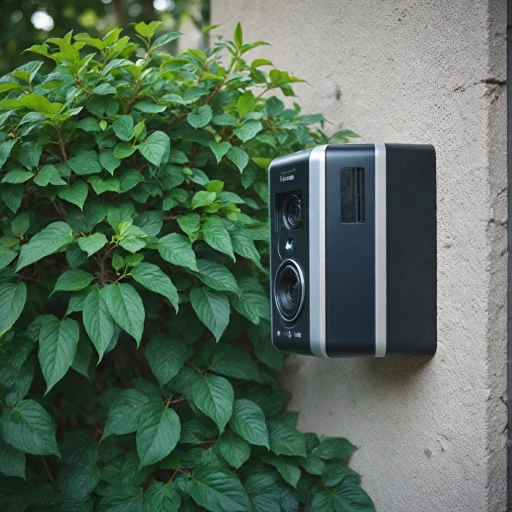
Design‑wise, the Blink Outdoor 4 cameras are pretty plain, and that’s not a bad thing. They’re small black squares with rounded corners, no big logos screaming for attention. On my house, they blend in on brick and darker siding, and they don’t make the place look like a fortress. The included mounts are simple ball‑joint style brackets, which let you angle the camera up, down, and side to side without fighting with it. Once you tighten the ring, they stay in place well enough; I haven’t had one sag out of position yet.
The field of view is 143° diagonal, which in practice means you can cover a driveway or a patio with a single camera if you place it right. If you mount it too high and try to cover the whole yard plus the street, you’ll get lots of small objects at the edges and the motion detection will be less reliable. I ended up lowering one camera to roughly head height and aiming it more toward the gate instead of trying to see everything at once, and the detection improved a lot.
One thing I liked is that the cameras are light and compact enough that mounting options are flexible. You can put them under soffits, on posts, or even on a fence with the right screws. I also tested one under a cheap third‑party camera hood to protect it from direct sun. That worked fine in the day, but at night the infrared light reflected off the inside of the white hood and washed out the image. Painting the underside of the hood matte black solved that, which shows these cameras are sensitive to reflections near the lens when IR is on.
The cameras are battery powered by default, but there’s a USB‑C port if you want to hard‑power them with third‑party weatherproof cables. I tried that on one unit to avoid worrying about batteries and to keep IR brightness on high. It worked well and made live‑viewing more practical, since constant live view will drain batteries faster. Overall, the design is basic, practical, and focused on staying out of the way rather than looking fancy.
Battery life vs marketing: depends heavily on how you use it
The big claim Blink pushes is “up to two years” of battery life on the included AA lithiums. In real life, that number is very optimistic and assumes light use: a few motion events a day, default settings, and not a ton of live viewing. If you put a camera facing a busy street, crank sensitivity up, and check live view often, you’re not seeing anywhere near two years. Some users reported needing new batteries after around a month with heavier use, and that lines up with what I’d expect in a high‑traffic spot.
In my setup, the driveway camera saw the most action. With medium sensitivity, clip length at 20 seconds, and activity zones set to ignore part of the street, the battery indicator dropped faster than the backyard camera, which barely saw anything except the occasional cat. The backyard unit barely moved off “OK” after several weeks, while the driveway camera clearly showed more wear. So the battery life is very location‑dependent. If you aim them smartly and don’t abuse live view, you’ll probably get several months to a year, but I wouldn’t bank on the full two years in most real‑world locations.
One workaround that I ended up liking is using third‑party weatherproof USB‑C power cables for the most active cameras. That way, I stopped caring about battery life on those units and could leave IR on high and use live view more often. It does mean drilling a small hole or routing a cable through a window or soffit, but once it’s done, it’s pretty low maintenance. For low‑activity spots, batteries are fine and you really can forget about them for a while.
So my honest take: the “two‑year battery” line is more of a “best case in a quiet area” situation than a promise. The batteries are good quality lithium cells and last much longer than cheap alkalines, but if you’re buying this system solely because you think you’ll never touch the cameras for two years, you’ll be disappointed. Treat the long battery life as a bonus when conditions are ideal, not a guarantee.
Durability and outdoor use: handles weather, but placement matters
The cameras are built for outdoor use, and in my experience they handle normal weather just fine. The spec says they operate from -4°F to 113°F, which covers most situations unless you’re in very harsh climates. Mine went through rain, wind, and a couple of colder nights without any signs of moisture issues or fogging inside the lens. The housing feels like decent plastic – not premium, but tough enough that I wasn’t worried about it cracking from a small bump or some hail.
Where durability ties into performance is how exposed the camera is to direct sun and rain. On a south‑facing wall that gets hammered by summer sun, the unit got warm but still worked. I did add a small hood above one camera to cut down on glare and heat, which helped the image during bright midday sun. The only downside, as I mentioned earlier, was IR reflection at night until I darkened the underside of the hood. So the camera itself seems okay with the elements, but you might want to help it out with smart placement under an eave or soffit.
The mounts have held up better than I expected. The ball joint is plastic but fairly solid. I tightened them once during installation and haven’t had any drooping or wobbling, even after some storms. If someone really wants to rip the camera off the wall, they can – this is still a small plastic device – but that’s true for most consumer‑level systems. The goal here is deterrence and evidence, not bulletproof hardware.
On the electronics side, I haven’t seen random reboots or weird behavior due to temperature swings. The only “durability” issue I’ve noticed is that signal quality drops more through thick brick walls, which isn’t really about build quality but is something to keep in mind. If your Sync Module is buried deep inside a brick house and your camera is on the far side, you might see disconnects or lag. Place the Sync Module smartly and you’ll avoid most of that. Overall, I’d call durability good for typical home use: not industrial‑grade, but fine for mounting around a house or small business.
Video, motion, and app performance: good enough with some quirks
On the performance side, the 1080p video is decent. During the day, the image is clear enough to see faces, license plates at close range, and small details like packages on the ground. It’s not as sharp or smooth as some higher‑end systems, but for general home monitoring it does the job. At night, the infrared view switches to black and white and is actually better than I expected: the IR coverage is wide and bright enough to see most of the yard, especially if you’re not trying to cover a football field. If you have motion‑activated floodlights, the camera will switch to color when those kick on, which looks even better.
Where things get a bit mixed is motion detection. The cameras use zones and sensitivity settings, and you can exclude parts of the scene that cause false triggers, like moving tree branches or a busy street. After a bit of tweaking, I got mine to a point where cars and people triggered reliably, and small animals were mostly ignored. But it’s not perfect: on misty or foggy mornings, I had extra clips where the sensor clearly got confused by moving “noise” in the air. Also, motion at the very edges of the frame is hit or miss compared to motion in the center.
Another thing to know: clip length tops out at 60 seconds per motion event. If someone hangs around longer, the camera can retrigger, but you’ll have multiple clips instead of one long one. That’s fine for most deliveries or quick checks, but not ideal if you want continuous recording. This system is really built around short motion clips, not 24/7 recording. The live view works, but there can be a couple seconds of delay when you start it, and more delay if your Wi‑Fi or Sync Module signal isn’t great.
The app is pretty straightforward: you see a grid of cameras, tap one to live view or check past clips, and adjust settings per camera. With the subscription, clips load faster and have thumbnails and person detection tags. Without it, local USB storage is slower to browse, and there are no thumbnails, so you often have to tap and wait a few seconds to see what each clip is. It’s not unusable, just less snappy. Overall, performance is pretty solid once tuned, but if you expect security‑grade, rock‑solid motion detection out of the box, you’ll need to invest some time in settings.
What you actually get and how it works in real life
In the box, you get three Outdoor 4 cameras, the Sync Module 2, six AA lithium batteries, mounts for each camera, a USB cable and power adapter for the Sync Module. No USB drive is included, so if you want local storage you need to buy your own flash drive. A cheap 64–128 GB stick is more than enough; the video files aren’t huge. Physically, each camera is a small black square, light enough that you can mount it on siding or brick with the included hardware without worrying it’ll rip out.
The basic setup is straightforward: plug in the Sync Module 2, connect it to your 2.4 GHz Wi‑Fi via the app, then add each camera one by one. The part that actually matters (and most people overlook) is where you put the Sync Module. It has to talk both to your Wi‑Fi and to all the cameras using its own low‑frequency radio. In my case, when I left it near the router at one end of the house, the camera on the far side had weak signal and lag. Moving the Sync Module more toward the middle of the house fixed most of that.
Once it’s up and running, you get 1080p live view, motion‑triggered clips, and two‑way audio through the Blink app. With the free cloud trial, clips show up fast and you get useful thumbnails and person detection. When the trial ends and you go USB‑only, clips load slower and you lose the fancier detection unless you pay. You can still live‑view and get motion alerts, so the system isn’t useless without a subscription, but it definitely feels a bit more basic.
In day‑to‑day use, I mainly relied on motion alerts and quick live views: checking if a package was on the porch, seeing who pulled into the driveway, or making sure the backyard was clear at night. For that kind of casual monitoring, the system is fine. If you’re trying to monitor a very busy street or want perfect person/vehicle classification, then you’ll either need the subscription or a different brand altogether.
Pros
- Simple wireless setup with a central Sync Module that supports local USB storage
- Decent 1080p video quality and strong infrared night vision for typical home use
- Good price-to-features ratio compared to many Ring/Nest style competitors
Cons
- Two-year battery claim is optimistic in busy areas; heavy use drains batteries much faster
- Best features (person detection, smoother playback, thumbnails) locked behind a subscription
- Motion detection can be finicky at the edges and needs tuning to avoid false alerts
Conclusion
Editor's rating
The Blink Outdoor 4 three‑camera system is a practical option if you want simple, wireless coverage around your home and you’re willing to live with some trade‑offs. The video quality is good enough for everyday security, night vision is solid, and the cameras are small and discreet. The Sync Module 2 plus USB storage gives you a way to avoid monthly fees, even if the cloud experience is smoother. Battery life can be very good in quiet areas, but in busy spots the “two‑year” claim is more like marketing than reality, so plan on either changing batteries more often or powering your most active cameras by cable.
I’d recommend this kit for people who want: an easy DIY setup, basic motion‑based recording, and the option to skip subscriptions by using local storage. It’s also a decent fit for rentals or Airbnbs where you just need to monitor entrances and driveways without rewiring anything. On the other hand, if you want 24/7 continuous recording, perfect person/vehicle detection without a subscription, or rock‑solid performance through lots of walls and long distances, this probably isn’t the system for you. In that case, you’re better off looking at more advanced (and pricier) camera ecosystems.