
Summary
Editor's rating
Value for money: good if you’re deep into Google, less so for everyone else
Design: big, obvious, and not exactly discreet
Battery life: decent, but very dependent on your settings
Durability and reliability: solid build, cloud is the weak point
Performance: motion, video and app speed in real use
What this Nest Doorbell actually offers in real life
Pros
- Tight integration with Google Home, Nest speakers and Chromecast displays
- Good motion detection with people/parcel/vehicle classification and usable 960p video
- Works both on battery and with existing doorbell wiring, plus 3 hours free event history
Cons
- Fully cloud‑dependent with no local storage or 24/7 recording
- Many advanced features (longer history, face recognition) require a paid Nest Aware subscription
- Bulky design and awkward to remove from the mount for charging

Specifications
View full product page →| Brand |
A doorbell that’s basically a Google gadget with a camera
I’ve been using the Google Nest Doorbell (battery, GWX3T) for a while now, and overall it feels like what you’d expect from Google: pretty polished on the software side, very tied to their ecosystem, and with a few annoying limits that feel more like business decisions than technical ones. If you already use Google Home, Nest speakers or a Chromecast, it plugs into that setup without much fuss and starts doing its job. If you don’t, a chunk of the appeal drops off fast.
What pushed me to try this instead of another Ring was the battery option plus the fact it still works with existing doorbell wires if you have them. I didn’t want to deal with transformers and rewiring, so being able to just screw a plate to the wall and go was a big plus. The other thing that caught my eye was the free 3 hours of event history. It’s not generous, but at least it’s something without paying a subscription, unlike some competitors that basically nag you into a plan from day one.
After living with it, I’d sum it up like this: the hardware is solid, the video is good enough, motion detection is smart, but the whole thing is glued to the cloud and clearly built to push you towards Nest Aware. It does its job as a doorbell camera, but you notice pretty fast where Google drew the line between “included” and “pay extra”. If you’re sensitive about cloud-only products or long‑term costs, that’s going to bother you.
So this review is from that angle: normal everyday use, no fancy lab tests, just real life. I’ll go through how it performs day to day, the battery situation, how reliable the alerts are, and whether it’s actually worth picking over Ring or cheaper brands if you’re mainly after a simple, dependable doorbell camera that doesn’t drive you mad.
Value for money: good if you’re deep into Google, less so for everyone else
In terms of price, the Nest Doorbell (battery) sits in that mid‑to‑upper range, roughly in the same ballpark as a Ring with battery. Is it good value? I’d say: yes, if you’re already on Google Home and you catch it on sale; average if you pay full price and then add a Nest Aware subscription on top. The free 3‑hour history is honestly the main thing that keeps the value reasonable, because you can actually use the doorbell properly without paying extra every month.
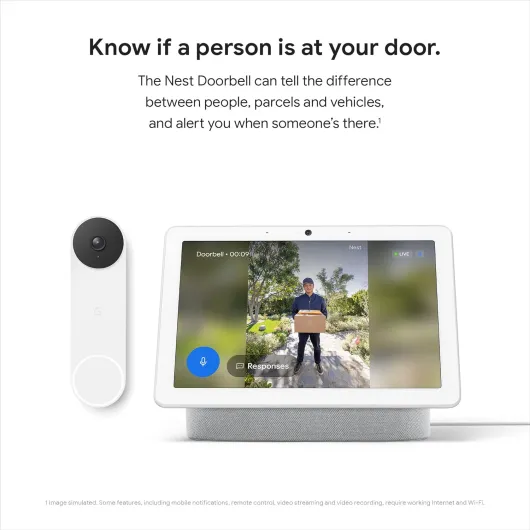
Compared to Ring, you get tighter integration with Google Assistant, Nest Hubs and Chromecast. Your speakers can act as chimes, your smart displays show the video feed, and setup is very smooth if you already live in that ecosystem. If your house is mostly Alexa, the value drops fast. Yes, there’s Alexa support, but several users pointed out it’s nowhere near as polished as Ring, and some features just don’t feel as natural. In that case, you’re paying premium money for a product that doesn’t mesh as well with your main system.
The other thing that impacts value is the cloud‑only model and subscription upsell. A lot of the cooler features like facial recognition and longer history are locked behind Nest Aware. If you don’t care about those and just want alerts, live view, and a short recent history, then it’s fine – you buy it once and you’re done. If you end up paying a monthly fee just to get what you consider basic security features, the total cost over a few years starts to look less attractive, especially when some competitors offer local storage or cheaper plans.
For what it does – decent video, smart motion alerts, good integration with Google gear, and flexible battery or wired use – I’d call the value pretty solid but not a bargain. It makes the most sense if you: 1) already have multiple Google devices, 2) don’t absolutely need long video history, and 3) can grab it at a discount. If you’re starting from scratch or you’re on Alexa, there are better ways to spend the same money.
Design: big, obvious, and not exactly discreet
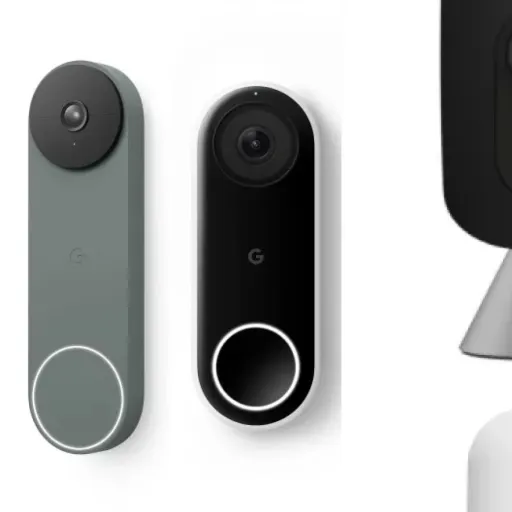
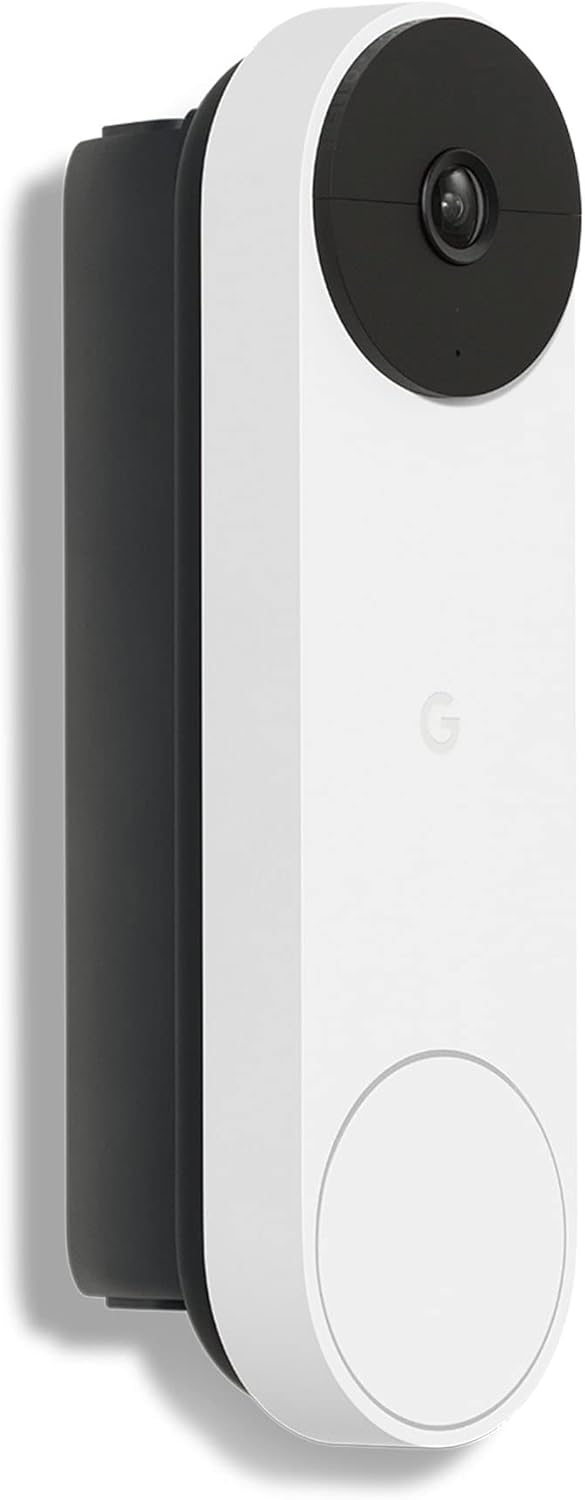
The first thing you notice when you unbox this Nest Doorbell is its size. It’s taller and bulkier than most Ring models. It’s not ugly, but it’s not subtle either. Once it’s on the wall, people see it immediately, especially in the Snow (white) colour. One reviewer even mentioned they liked that it’s obviously there and lights up when it detects movement, acting as a bit of a deterrent. If you wanted something that blends into the door frame, this isn’t it.
The shape is a simple rectangular bar with rounded edges, camera at the top and doorbell button at the bottom. The ring around the button lights up when someone approaches or presses it. From a user point of view, it’s clear: people know where to press and they see it’s active. I’ve had zero “where’s the doorbell?” comments since installing it, which I did get with a tiny older model from another brand.
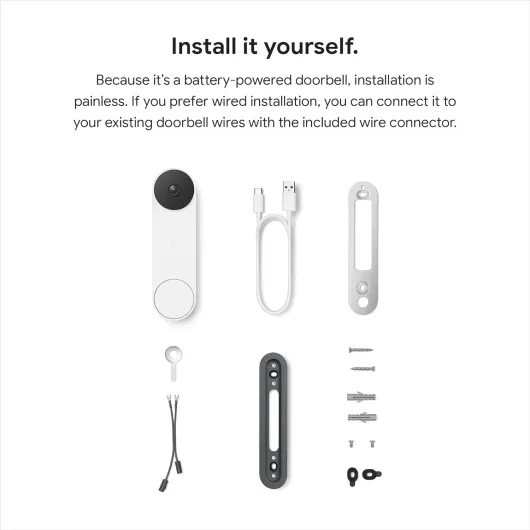
Mounting is mostly fine but not perfect. The template and included wedge are handy, and drilling the holes is straightforward. The awkward bit is actually clipping the doorbell onto the base plate. You have to hook the bottom just right and then push up firmly until it clicks, and it feels like you might snap it the first time. Removing it to recharge is also fiddly, even with the supplied tool, and a couple of users warned about possibly damaging the little notch at the back if you’re not careful. It’s secure once in place though, which is the upside – it doesn’t wobble or feel loose.
From the street, it looks like a proper security device more than a basic doorbell. That’s either a plus or a minus depending on what you want. Personally I like that it’s obvious, but I can see someone in a flat or a more design‑driven house finding it a bit chunky. Build feels solid, no creaks or cheap plastic vibes, and the IP/weather handling has been fine so far in rain and colder days. Just don’t expect a small, discreet gadget – this sits there and clearly tells everyone “you’re on camera”.
Battery life: decent, but very dependent on your settings
The battery situation is one of those “it depends how you use it” things. Officially, Google says battery life varies with motion, temperature and settings, and that’s accurate. In a quiet area with tuned motion zones and standard quality, you can stretch it to a couple of months between charges. In a busy street with max quality and constant recording of every bit of movement, expect more like 4–6 weeks. One Amazon reviewer reported exactly that: about a month with a Nest Aware subscription and heavy use, and 2–3 months after cancelling and going back to the free 3‑hour history.
The logic behind that makes sense: with the 3‑hour free plan, a lot of the work seems to be handled locally, and it only uploads what’s needed. With the 30‑day cloud history, there’s more constant uploading and processing, which obviously eats more power. So if battery life is a priority and you don’t care about long history, not subscribing actually helps. It’s a bit ironic, but that’s how it behaves in real life. In my use, with no subscription, tuned zones and medium video settings, I land somewhere around 2 months per charge.
Charging itself is straightforward but slightly annoying because of the mount. You have to pop the doorbell off the plate with the little tool, bring it inside and charge via the USB cable. There’s no removable battery pack like some Ring models. If you don’t want downtime, you either live without the doorbell while it charges or wire it permanently to your existing chime wires so it trickle charges and you never have to remove it. The wired option works even on this “battery” version, which is a nice touch, but not everyone has doorbell wiring ready to go.
Overall, battery life is fine as long as you set it up sensibly: use activity zones, avoid maxing out clip length and quality, and think twice before paying for long cloud history if you don’t really need it. In cold weather, like most lithium batteries, it will drain faster, so if you’re in a very cold climate, plan for shorter intervals between charges. It’s not the worst I’ve used, but it’s not magic either – heavy activity and subscriptions clearly shorten how long it lasts.
Durability and reliability: solid build, cloud is the weak point
Physically, the Nest Doorbell (battery) feels sturdy enough for outdoor use. It’s not heavy, but the casing doesn’t feel flimsy and it has handled rain, wind and a few colder weeks without any drama. No fogging inside the lens, no water ingress, and the button still clicks like day one. It doesn’t feel like the type of plastic that goes chalky within a year, though long‑term sun exposure will always mark white devices a bit. So far, there’s nothing that makes me worry it will fall apart quickly.
The mounting system, while a bit annoying to clip and unclip, actually helps with durability once it’s in place. There’s not much movement or play, so less risk of micro‑cracks around the screws or the housing coming loose. The weak point physically is that little notch used by the release tool – if you’re rough or impatient taking it off, you could damage it over time. So you do have to be a bit gentle when removing it for charging if you’re not wired.
Where durability gets a bit more questionable is reliability over time with software and cloud. The device is heavily dependent on Google’s servers and the Google Home app. If the app has a bug, or Google changes something in their ecosystem, you feel it immediately. Some users have seen issues like night vision glitches or slow connections that were later improved with updates. That’s good in one sense, but it also means you’re at the mercy of updates you don’t control. If Google ever decides to shift features around or push harder on subscriptions, there’s not much you can do.
Another angle is privacy and long‑term access. Because there’s no local storage or local control, if your internet is out or Google’s service has a hiccup, you basically lose your security camera until it comes back. For a product that’s meant to monitor your front door, that’s not ideal. Hardware durability itself seems pretty solid, but the overall reliability is tightly tied to the stability of Google’s cloud and their interest in keeping this model well supported. If you’re okay living in that ecosystem, it’s fine. If you like devices that keep working even if the company disappears, this one doesn’t tick that box.
Performance: motion, video and app speed in real use
On performance, it’s mostly good but not flawless. Motion detection is actually one of the better parts. It picks up people reliably, and the object detection for cars, parcels and animals is useful. It’s not perfect 100% of the time, but compared to cheaper cameras that trigger on every leaf, it’s a clear step up. The key thing is to set up activity zones right away. If you leave it on full frame, it’ll fire alerts for pedestrians, cars on the road, even birds. Once I limited it to just my path and doorstep, the number of pointless notifications dropped a lot and the battery held up better.
Video quality at 960p / 30 fps is decent. Not mind‑blowing, but more than enough for its job. Faces are clear, you can see clothing details and parcels, and the field of view is wide enough to cover a typical front door area plus some of the path. Daytime footage is sharp. At night, the infrared night vision gives a usable, slightly grainy black‑and‑white image. One user mentioned a bug where you see white flashes at the start of some night clips because the IR toggles – that can happen, and the workaround is to turn off night vision if your street is well lit. In my case it’s fairly dark, so I left it on and just live with the occasional glitch.
Latency and app speed are okay but not instant. When the doorbell is pressed, my phone gets a notification within about a second or two, and my Google speakers chime quickly as well. Opening the live view from the app can take a few seconds to connect, especially if your Wi‑Fi is a bit loaded. It’s better now than older Nest gear, and some reviewers noticed recent updates improved it, but there are still moments where you’re staring at a loading spinner wishing it would hurry up before the person walks away.
One big limitation is that it’s fully cloud‑dependent. There’s no local stream, no SD card, and without internet the thing is basically blind. For a security device, that’s not great. If your connection drops, you lose both live view and recording. Also, 24/7 recording isn’t supported at all, even if you wire it. You only get event‑based clips, 3 hours history for free, or up to 30 days with Nest Aware. If you’re fine with quick event clips and don’t need constant recording, it does the job well enough. But if you like the idea of local storage or local automations with something like Home Assistant, this camera will frustrate you.
What this Nest Doorbell actually offers in real life
On paper, the Google Nest Doorbell (battery) is a wireless 960p video doorbell with motion detection, night vision and smart alerts for people, parcels and vehicles. In practice, that means: it spots someone walking up the path, records a short clip, and pings your phone or smart speakers. Video tops out at 960p, which sounds low compared to 1080p or 2K cameras, but in real use it’s fine for recognising faces and reading bigger delivery labels. It’s not cinema quality, but you clearly see who’s at the door.
You set everything up through the Google Home app, not the old Nest app. You scan the QR code on the back, it joins Wi‑Fi, and then you can tweak zones, notifications and battery settings. If you have Google speakers or Nest Hubs, they’ll ring and show the live feed when someone presses the button. It also works with Alexa, but that integration is more basic and clearly not the main focus. Several users pointed out they wouldn’t buy this if they were mostly on Alexa; Ring is simply better integrated there.
Out of the box, you get: the doorbell, a base plate, wedge, spacers, wall screws and anchors, a short charging cable and a release tool. No chime, no transformer, no subscription. The free plan gives you 3 hours of event history, which is enough to check recent visitors or deliveries if you look fairly quickly. If you want 30+ days of history or features like facial recognition, that’s locked behind the Nest Aware subscription. So it “works” without a plan, but you feel the limits if you’re used to scrolling back through a full day or week of footage.
Overall, in day‑to‑day use it behaves like a straightforward smart doorbell: it records short clips instead of 24/7 video, sends you alerts, lets you talk to the person at the door, and plugs into your existing Google smart home gear. There’s nothing mind‑blowing here, but it’s pretty solid for basic home monitoring, as long as you accept the cloud dependence and the idea that some features are basically paywalled.
Pros
- Tight integration with Google Home, Nest speakers and Chromecast displays
- Good motion detection with people/parcel/vehicle classification and usable 960p video
- Works both on battery and with existing doorbell wiring, plus 3 hours free event history
Cons
- Fully cloud‑dependent with no local storage or 24/7 recording
- Many advanced features (longer history, face recognition) require a paid Nest Aware subscription
- Bulky design and awkward to remove from the mount for charging
Conclusion
Editor's rating
Overall, the Google Nest Doorbell (battery, GWX3T) is a solid, practical choice if you’re already in the Google ecosystem and want a no‑nonsense smart doorbell. The strengths are clear: easy setup through Google Home, decent 960p video, reliable motion detection with people/parcel/vehicle tagging, and the option to run it purely on battery or hook it into existing doorbell wires. The free 3‑hour event history is actually useful and lets you avoid a subscription if your needs are basic – quick checks on who came to the door, parcel drops, that sort of thing.
On the downside, it’s big, fully cloud‑dependent, and clearly designed around subscriptions. There’s no local storage, no 24/7 recording, and without internet it’s basically dead weight. Battery life is okay but can drop to around a month if you hammer it with motion and long cloud history, and removing it from the mount to charge is a bit fiddly. If your home is mainly Alexa‑based, Ring still makes more sense. If you care a lot about local control, privacy, or avoiding long‑term cloud lock‑in, this probably isn’t the right product.
If you’ve already got Nest Hubs, Google speakers and Android phones around the house, this doorbell fits in nicely and gets the job done without being flashy. If you’re more mixed or on a tight budget, I’d only recommend it when it’s on sale and if you’re okay using it on the free tier without paying for Nest Aware.