

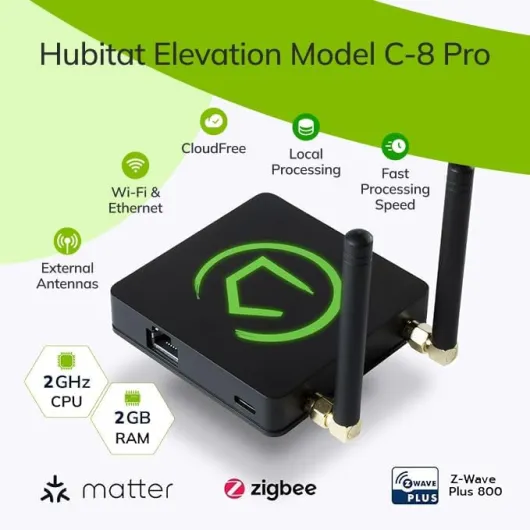
Understanding zwave hub technology
What is Z-Wave and How Does It Work in Smart Homes?
Z-Wave is a wireless communication protocol designed specifically for smart home devices. Unlike Wi-Fi or Bluetooth, Z-Wave operates on a low-frequency radio band, reducing interference with other household electronics. This makes it ideal for connecting a wide range of smart devices, including smart doorbells, light switches, sensors, and more. Z-Wave hubs act as the central control point, allowing you to manage and automate your devices from a single interface.
Why Use a Z-Wave Hub with Your Smart Doorbell?
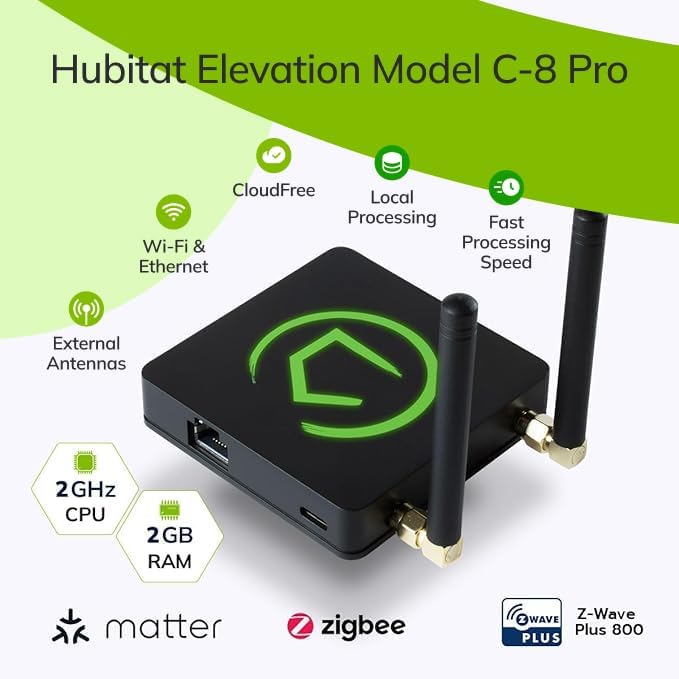
When you connect your smart doorbell to a Z-Wave hub, you unlock new levels of control and integration. A smart hub like Homey, Hubitat, Homeseer, or SmartThings can bring together devices from different brands, making your home automation system more flexible. Many Z-Wave hubs also support other protocols such as Zigbee, Wi-Fi, and even voice assistants like Alexa and Google Assistant. This means you can control your doorbell and other devices using voice commands or through a single app.
Compatibility and Range: What to Consider
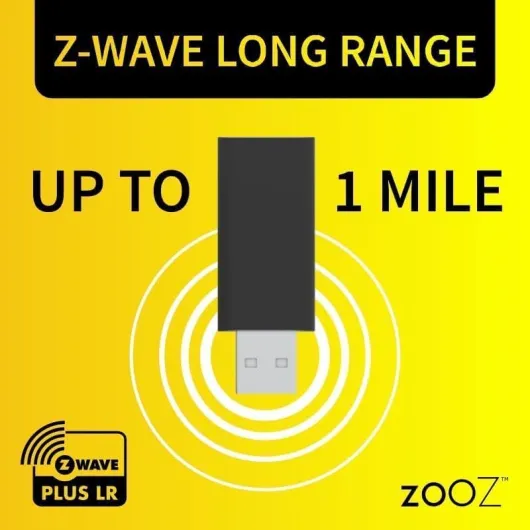
One of the key strengths of Z-Wave technology is its long range and mesh networking. Each Z-Wave device acts as a repeater, extending the signal throughout your home or small business. This is especially useful for larger properties or when you want to ensure reliable communication between your smart doorbell and the hub. When shopping for a Z-Wave hub, check for compatibility with your existing devices and support for the latest Z-Wave series, such as Z-Wave Plus or Z-Wave Long Range.
- Compatible Devices: Look for hubs that support a wide range of Z-Wave smart devices, including doorbells, sensors, and light switches.
- Voice Assistant Integration: Many hubs work with Alexa, Google Assistant, and other smart home platforms.
- Price and Product Range: Hubs vary in price and features, so consider your needs and budget before you shop.
For those comparing smart doorbell options, understanding how Z-Wave hubs fit into your ecosystem is crucial. If you're deciding between popular brands, this guide to choosing between SimpliSafe and Ring can help you find the right fit for your smart home setup.

Benefits of connecting your smart doorbell to a zwave hub
Why Connect Your Smart Doorbell to a Z-Wave Hub?
Pairing your smart doorbell with a Z-Wave hub unlocks a range of benefits that go beyond simple notifications. Z-Wave technology is designed for smart home integration, offering robust compatibility with a wide array of devices. This means you can control your doorbell and other smart devices—like light switches or sensors—from a single hub, such as SmartThings, Hubitat, or HomeSeer. If you’re comparing options, it’s worth reading this guide on choosing between SimpliSafe and Ring for more insights on product compatibility.
Centralized Control and Automation
With a Z-Wave hub, you gain centralized control over your smart home. Whether you use Alexa, Google Assistant, or a dedicated smart hub, you can automate routines. For example, when someone rings your doorbell, your Z-Wave hub can trigger a series of actions: turn on porch lights, send alerts to your phone, or even unlock a smart lock for trusted visitors. This level of automation is especially valuable for small business owners who need efficient access control and monitoring.
- Wide Compatibility: Z-Wave hubs support a variety of smart devices, including wave series products, light switches, and sensors. Many hubs, like Homey Pro or SmartThings, also support Zigbee and Wi-Fi devices, expanding your options.
- Long Range and Reliability: Z-Wave long range technology ensures stable connections throughout your home or business, reducing dead zones and improving response times.
- Flexible Integration: You can connect your smart doorbell with other wave devices, creating custom automations that fit your lifestyle or business needs.
Cost-Effectiveness and Future-Proofing
Investing in a Z-Wave hub can be cost-effective in the long run. Instead of buying separate controllers for each device, a single hub manages all compatible products. This not only saves on price but also simplifies support and maintenance. Many wave hubs, like Hubitat or Homeseer Smart, offer regular updates and strong community support, ensuring your system stays current as new devices are released.
Ultimately, connecting your smart doorbell to a Z-Wave hub enhances your smart home experience by providing seamless control, reliable performance, and the flexibility to expand your system as your needs grow.
Key features to look for in a zwave hub for doorbells
What Makes a Z-Wave Hub Ideal for Smart Doorbells?
Choosing the right Z-Wave hub for your smart doorbell is crucial. Not all hubs are created equal, and the features you prioritize can make a big difference in your daily experience. Here are the most important aspects to consider when shopping for a hub that will support your smart doorbell and other smart devices:
- Compatibility: Ensure the hub supports a wide range of Z-Wave devices, including your smart doorbell, light switches, and sensors. Look for hubs that mention compatibility with popular brands like Homey, Hubitat, Homeseer, and SmartThings. Some hubs also support Zigbee and Wi-Fi, which can be useful if you plan to expand your smart home ecosystem.
- Integration with Voice Assistants: If you use Alexa, Google Assistant, or both, check that the hub offers seamless integration. This allows you to control your doorbell and other devices using voice commands. Many users appreciate the convenience of asking Alexa or Google to show who’s at the door or to control other connected devices.
- Range and Reliability: Z-Wave long range and series wave technology are key for larger homes or small businesses. A hub with strong range ensures that your doorbell and other wave devices remain connected, even if they’re far from the hub. Look for products that mention “range wave” or “wave long” in their specifications.
- Ease of Use and Setup: Some hubs, like SmartThings and Homey Pro, are known for their user-friendly interfaces and straightforward setup processes. If you’re new to smart home tech, this can save you a lot of frustration.
- Automation and Control: Advanced hubs allow you to create custom automations. For example, you can set your smart doorbell to trigger lights or send alerts to your phone. Look for hubs that support robust automation features and have a good track record with smart home control.
- Support and Updates: Reliable customer support and regular firmware updates are essential. Hubs like Homeseer Smart and Hubitat are known for their active communities and ongoing product support.
- Price and Value: The price of a Z-Wave hub can vary widely. Consider what features you truly need. Sometimes, a more affordable hub meets all your requirements, while in other cases, investing in a pro model pays off in the long run.
When evaluating your options, it’s also smart to check if the hub is “hub required” for certain devices or if it can work independently. If you’re running a small business or have a large home, prioritize hubs with long range and support for many devices. For a deeper dive into how custom IoT development can further enhance your smart doorbell setup, check out this guide to custom IoT solutions for smart doorbells.
| Hub | Voice Assistant Support | Range | Compatible Devices | Price Range |
|---|---|---|---|---|
| Homey Pro | Alexa, Google Assistant | Long | Z-Wave, Zigbee, Wi-Fi | High |
| SmartThings | Alexa, Google Assistant | Medium | Z-Wave, Zigbee | Medium |
| Hubitat | Alexa, Google Assistant | Long | Z-Wave, Zigbee | Medium |
| Homeseer | Alexa, Google Assistant | Long | Z-Wave | Medium to High |
| Wink | Alexa, Google Assistant | Medium | Z-Wave, Zigbee | Low to Medium |
Ultimately, the best smart hub for your doorbell depends on your needs, the devices you want to control, and your budget. Take your time to compare features and shop for a product that offers the right balance of compatibility, support, and price.
Integrating your smart doorbell with other zwave devices
Making Your Smart Doorbell Part of a Connected Home
Integrating your smart doorbell with other Z-Wave devices is a practical way to get more from your home automation setup. A Z-Wave hub acts as the central control point, letting you connect and manage a wide range of smart devices, from light switches to sensors and locks. This integration helps you create routines and automations that make daily life easier and more secure.
- Unified Control: With a smart hub like Hubitat, Homey Pro, or SmartThings, you can control your doorbell and other Z-Wave devices from one app. This means you can set up actions such as turning on a porch light when someone rings the bell, or unlocking a smart lock for a trusted visitor.
- Voice Assistant Compatibility: Many Z-Wave hubs support Alexa, Google Assistant, and sometimes even Siri. This allows you to use voice commands to check your doorbell status or trigger automations, making your smart home more accessible.
- Cross-Platform Integration: Some hubs, like Homey and SmartThings, also support Zigbee and Wi-Fi devices. This means you can mix Z-Wave, Zigbee, and Wi-Fi products in your automations, giving you flexibility when you shop for new devices.
- Long Range and Reliability: Z-Wave Long Range technology extends the reach of your network, making it suitable for larger homes or small business setups. This ensures your doorbell and other devices stay connected, even at the edge of your property.
Automations That Make a Difference
By connecting your smart doorbell to a Z-Wave hub, you can create automations that go beyond basic notifications. For example, when your doorbell rings, you can:
- Trigger a compatible Homeseer smart light switch to turn on your entryway lights.
- Send alerts to your phone or smart speaker using Alexa or Google Assistant.
- Activate a camera or record a video clip for added security.
These automations are not limited to residential use. Small businesses can also benefit by integrating smart doorbells with Z-Wave hubs to manage access and monitor visitors more efficiently.
Choosing Compatible Devices
When building your smart home, always check if your doorbell and other devices are compatible with your chosen Z-Wave hub. Popular hubs like Hubitat, Homeseer, and SmartThings Wink offer broad support for Z-Wave series devices, but some products may require specific firmware or additional setup. Consider the price, range, and support options before making a purchase to ensure a smooth experience.
Troubleshooting common zwave hub and doorbell issues
Common Problems and How to Fix Them
Even with the best wave hub and smart doorbell setup, issues can pop up. Knowing what to expect and how to troubleshoot can save you time and frustration. Here are some frequent problems users encounter with wave devices and smart hubs, along with practical solutions:
- Connectivity Drops: If your smart doorbell loses connection to the wave hub, check the range. Wave long range hubs or pro series wave hubs can help, but physical barriers and interference from other smart devices may still cause issues. Try relocating your hub or adding a compatible repeater to extend coverage.
- Device Not Recognized: Sometimes, the hub does not detect your doorbell or other wave smart devices. Ensure your product is compatible with your hub (like Hubitat, Homeseer smart, or SmartThings). Updating firmware on both the hub and the doorbell can also resolve many recognition issues.
- Delayed Notifications: If alerts from your smart doorbell are slow, check your network speed and the hub’s processing capacity. Some wave hubs, such as Homey Pro or SmartThings Wink, handle multiple devices better than entry-level models. Consider upgrading if you have a large number of smart devices.
- Integration with Voice Assistants: Problems connecting with Alexa, Google Assistant, or other assistants often stem from outdated integrations or missing support. Make sure your hub supports Alexa Google or Google Assistant, and that you’ve enabled the correct skills or plugins.
- Interference with Other Devices: Wave technology can sometimes clash with Zigbee or Wi-Fi networks. If you notice issues when using a light switch or other wave zigbee devices, try changing the channel on your hub or moving devices further apart.
When to Seek Support or Consider a New Hub
If you’ve tried these steps and still face problems, it might be time to contact the manufacturer’s support or shop for a new wave hub. Price can be a factor, but investing in a hub required for your specific smart devices ensures smoother operation. Look for hubs with strong support for wave long range, series wave, and a wide range of compatible products, especially if you’re managing a small business or a complex smart home setup.
Privacy and security considerations with zwave hubs
Protecting Your Data and Home with Z-Wave Hubs
When adding a smart doorbell to your home, privacy and security should be top priorities. Z-Wave hub technology, used in products like Homey, Hubitat, Homeseer, and SmartThings, offers several advantages, but also introduces new considerations. Here’s what you need to know to keep your smart devices and personal information safe.
- Local Control vs. Cloud Reliance: Many Z-Wave hubs, such as Hubitat and Homeseer, support local device control. This means your doorbell and other wave devices can function without constantly sending data to the cloud, reducing exposure to external threats. However, some hubs, like SmartThings, rely more on cloud services, which may affect privacy depending on their policies.
- Encryption and Secure Communication: Z-Wave technology uses AES-128 encryption for secure communication between your smart hub and devices. Always check that your hub and doorbell support the latest Z-Wave series (like Z-Wave Plus or Z-Wave Long Range) for enhanced security features.
- Device Compatibility and Updates: Using compatible products, such as Homeseer smart devices or wave zigbee hubs, ensures you receive regular firmware updates. These updates often patch vulnerabilities and improve security. Avoid unsupported or outdated devices, even if the price is attractive when you shop for new products.
- Voice Assistant Integration: Connecting your Z-Wave hub to Alexa, Google Assistant, or other smart assistants can add convenience, but also increases the number of platforms handling your data. Review privacy settings and permissions for each assistant, especially when using features like remote unlocking or video streaming.
- Network Segmentation: For small business or home setups, consider creating a separate network for your smart devices. This limits the risk if one device is compromised, protecting your main home network.
Best Practices for Secure Smart Doorbell Use
- Change default passwords on your hub and doorbell immediately after setup.
- Enable two-factor authentication where available, especially for remote control features.
- Regularly review connected devices and remove any you no longer use.
- Check the support policies of your hub provider to ensure long-term security updates.
By understanding the privacy and security features of your Z-Wave hub and smart doorbell, you can enjoy the benefits of smart home technology—like controlling a light switch or integrating with Alexa Google—while keeping your data and home safe. Always prioritize products with strong support, compatibility, and up-to-date security features, whether you choose a pro-level hub or a more affordable option.