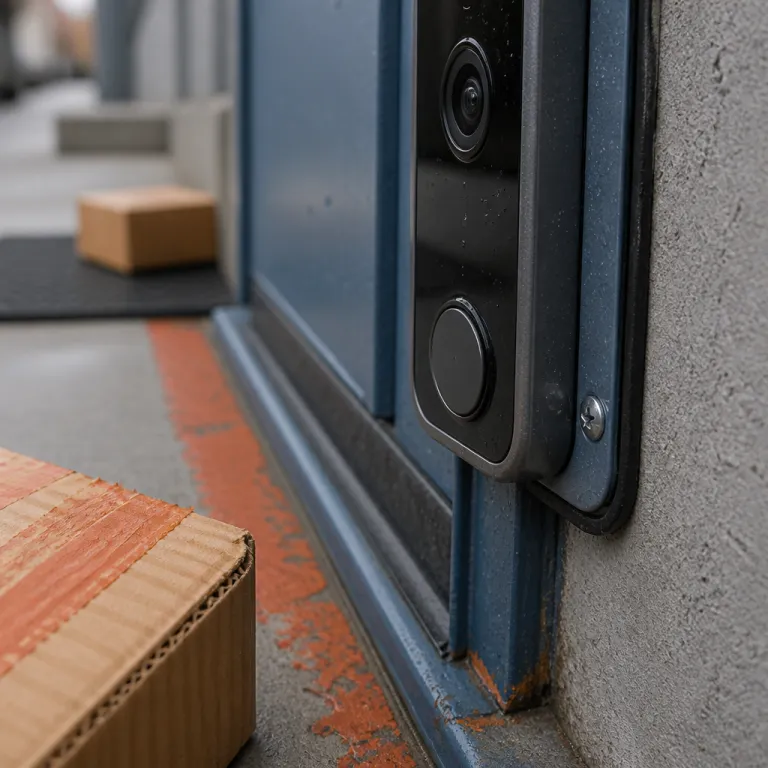
Doorbell field of view and package position: how to see every delivery

Why doorbell field of view and package position rarely line up
Your smart doorbell probably sees faces but misses boxes on the ground. The core problem is that the doorbell field of view and the package position rarely overlap, because drivers follow habits while cameras follow mounting templates. If you want reliable front door security and package visibility, you must frame the real drop zone, not the ideal one.
Most video doorbell models advertise a wide viewing angle, often around 150° to 180° horizontally and 90° to 120° vertically. For example, the Google Nest Doorbell (battery) lists a 145° diagonal field of view, while the Ring Video Doorbell 4 specifies 160° horizontal coverage in its product documentation. That sounds generous, yet the actual view of your porch depends on mounting height, tilt angle, and the aspect ratio of the video content that the camera records. A tall 4:3 or 3:4 aspect ratio usually shows more ground than a cinematic 16:9 view, which matters more for packages than for portraits.
Across the United States, postal and courier drivers tend to place parcels on the closest flat surface to the door, usually 60 to 120 centimetres (about 2 to 4 feet) from the threshold. USPS carrier training materials and UPS driver guidelines both emphasise placing packages close to the door in a stable, weather-sheltered spot, which often ends up in that same band in front of the entry. If your doorbell camera sits at 120 centimetres (roughly 48 inches) with no downward tilt, the product box may land just outside the lower edge of the frame. A small 5° to 15° downward tilt or a wedge mount can shift that video quality sweet spot so both the visitor and the parcel stay in live view.
Think of your doorbell as a specialised security camera for a single rectangle of concrete. The right position turns that camera into a reliable security tool that reduces false alarms and shows clear evidence when something goes wrong. The wrong position gives you a nice view of the street, the cars, animals passing by, and almost no proof when a package vanishes.
Before installing a doorbell or moving an existing one, take time to audit your porch. Scroll through at least a month of delivery video if you already own a video doorbell, or simply read the labels on old boxes to see where drivers prefer to leave them. That simple review of your own data will tell you more about the real drop zone than any generic mounting diagram or marketing photo.
How to audit your drop zone and frame both faces and parcels
Start with a tape measure and your last thirty days of deliveries. Note where each package actually sat relative to the door, then sketch a rough map of the porch showing the main drop zone for different box sizes. This quick audit turns the vague idea of doorbell field of view and package position into concrete measurements you can work with.
Most homes in the United States see parcels land between 60 and 120 centimetres (2 to 4 feet) from the front door, slightly to the handle side. If your existing doorbell is wired into trim on the hinge side, the camera may be angled away from that hot spot, even if the product claims a very wide field of view. In that case, a simple angled mounting wedge can rotate the camera toward the real drop zone without touching the electrical power source.
Height matters just as much as sideways angle. A doorbell mounted around 120 centimetres (about 4 feet) with a slight downward tilt usually balances visitor faces, package visibility, and video quality, while keeping motion detection reliable. Mounting much higher often cuts off the ground, while mounting much lower can distort faces and increase false alarms from cars, animals, and shadows.
Once you know the drop zone, use your phone as a stand-in for the doorbell camera. Hold it where the doorbell will sit, tilt it until both your face and the package spot appear in the same live view, and note that angle. This low-tech rehearsal gives you a preview of the final video content before you commit to drilling holes or calling an electrician.
If your porch layout makes that framing impossible, consider shifting the drop zone instead of the camera. A large, clearly marked mat placed inside the camera view often nudges drivers to set packages where your security cameras can see them. For long driveways or side entries, pairing a smart doorbell with a dedicated driveway alert, as explained in this guide on enhancing your smart doorbell experience with a driveway sensor, can give you earlier notice that a delivery is approaching.

Choosing the right camera, aspect ratio, and power for package coverage
Not every video doorbell is equally good at watching the ground. When you care about the doorbell field of view and package position, you should prioritise vertical coverage and low-angle clarity over sheer resolution. A sharp 1080p feed that shows the doormat beats a 4K video that only captures shoulders and sky.
Look closely at the advertised aspect ratio before you buy any doorbell camera product. Tall formats such as 4:3 or 3:4 give more usable field of view for packages because they extend the frame downward toward the threshold. Wide 16:9 formats can still work, but you will need more careful installation of the doorbell and a steeper tilt to keep both faces and parcels in frame without sacrificing video quality.
Power and connectivity also shape what you actually see. A wired doorbell with constant power can maintain higher bit rates, stronger Wi‑Fi streaming, and more reliable real-time live view, which helps when you need to zoom in on a label or a face. Battery-powered models are flexible to mount, especially near tricky trim, but aggressive power saving can delay motion detection and shorten recorded clips around the front door.
Some battery-powered units now accept an optional solar panel, which can support longer clip lengths and more frequent motion events without draining the battery. Solar support is most useful on bright, unobstructed porches, while shaded entries still benefit more from a stable wired power source. Either way, aim the camera so that night vision infrared LEDs illuminate the drop zone evenly, or you will get grainy video at night just when you need clear evidence.
If you share an entry with neighbours or live in a duplex, the right field of view becomes even more delicate. A smart doorbell placed to respect shared boundaries while still covering your own packages may need a narrower angle and stricter motion zones. For more complex layouts, a specialised guide to smart doorbells for duplexes and shared entries can help you balance coverage, privacy, and peace of mind without turning your security camera into a source of conflict.
Accessibility also matters when you are tuning alerts for packages. If someone in your household has hearing loss, pairing the doorbell with visual alerts or smart lights ensures that a delivery call never goes unnoticed. A detailed overview of smart doorbells with visual alerts for the hearing impaired shows how to turn simple video notifications into inclusive, reliable security for everyone in the home.
Dual cameras, motion zones, and smarter alerts for missing packages
Single-lens doorbells can frame both faces and parcels, but they always involve compromise. Dual-camera designs, with one lens facing forward and another pointing down, change the doorbell field of view and package position equation entirely. You get a dedicated portrait view for visitors and a separate ground view for boxes, without forcing one camera to do both jobs.
Models such as the Eufy Video Doorbell E340 use this dual-lens approach to give you a wide forward video plus a tight downward shot of the doormat. The upper camera handles the usual visitor content, while the lower camera behaves like a mini security camera aimed squarely at the drop zone. This split view makes it easier to set motion detection zones that ignore passing cars, animals on the street, and blowing branches while still reacting instantly when a hand reaches toward a parcel.
Smarter alerts matter as much as smarter optics. Look for video doorbell software that can label events as people, packages, or general motion, because that classification reduces false alarms and lets you filter for the clips that actually affect security. Some ecosystems can even send a specific notification when a package is detected and another when the package is no longer visible in the frame for a certain time.
That picked up versus left behind delta is the backbone of a practical package-gone alert. The system compares the live view and recent recordings from the doorbell camera, then flags when a box that was present during one call or motion event has vanished without a matching delivery pickup event. To keep those alerts trustworthy, you must align the field of view so the entire drop zone stays inside the frame, or the software will misread partial views as normal movement.
Night vision performance is another critical piece of this puzzle. A camera with strong infrared illumination and clean night video quality will show whether a neighbour collected a parcel for you or a stranger walked off with it at two in the morning. When you combine that clarity with tuned motion zones and reliable Wi‑Fi, you get fewer useless pings and more actionable, time-stamped evidence that genuinely supports your peace of mind.
Porch tweaks, neighbour angles, and when to add extra security cameras
Sometimes the easiest way to fix the doorbell field of view and package position problem is to move the package, not the camera. A bold, weatherproof mat placed squarely inside the doorbell camera frame quietly tells drivers where to set boxes. Over a few weeks, most couriers will follow that visual cue, and your video content will start to show parcels exactly where you planned.
Small porch rearrangements can have a big impact on security. Shifting a bench or planter so it sits just inside the field of view can create a natural shelf where packages stay visible to the video doorbell while remaining less exposed from the street. The goal is to keep the drop zone within the camera view without advertising your deliveries to every passer-by or to distant security cameras across the road.
In some layouts, one doorbell camera simply cannot cover everything. A separate security camera mounted under the eaves can watch the wider approach, including cars, animals, and foot traffic, while the doorbell focuses tightly on the front door and the immediate drop zone. When you choose that combination, match the video quality and night vision capabilities so clips from both angles tell a coherent story if you ever need to share them with law enforcement.
Neighbour cooperation can quietly extend your coverage. If their camera already sees your porch from the side, a quick review and a friendly agreement can give you overlapping views that strengthen both households' security. In return, your own live view might capture helpful angles of their driveway or gate, creating a small, informal network of support without extra hardware.
Whatever mix of devices you choose, keep the basics in mind. Stable power, whether wired or via a well-placed solar panel, and strong Wi‑Fi are what keep real-time alerts flowing and recordings intact when something happens at the worst possible time. When those foundations are solid, every adjustment to angle, aspect ratio, and drop zone placement pays off in quieter notifications and genuine peace of mind.
FAQ
What is the best height to mount a doorbell for package visibility ?
For most porches, mounting the doorbell around 120 centimetres (about 4 feet) from the ground with a slight downward tilt gives a good balance between visitor faces and package coverage. That height usually keeps the main drop zone, about 60 to 120 centimetres (2 to 4 feet) from the door, inside the lower third of the frame. Always test with your phone before drilling, because steps, railings, and siding can change the ideal position.
Do I need a dual camera doorbell to see packages clearly ?
You do not strictly need a dual-camera model, but it makes framing easier on tricky porches. A single-lens doorbell with a tall aspect ratio and a wedge mount can still capture both faces and parcels if you tune the angle carefully. Dual-camera designs mainly help when you have limited mounting options or want separate, dedicated views for visitors and the ground.
How can I reduce false alarms from cars and animals while tracking packages ?
Use motion zones to limit detection to the area near your doormat and front step. Then enable person and package detection if your video doorbell software supports those smarter filters, which ignore most passing cars and small animals. Adjust sensitivity gradually over several days, watching which alerts you actually read and which you dismiss.
Is wired power better than battery power for package monitoring ?
Wired power is usually better for intensive monitoring because it supports longer clips, faster real-time alerts, and more frequent live view checks without worrying about battery life. Battery-powered models are easier to place exactly where the field of view works best, especially on older door frames without existing wiring. If you choose a battery-powered unit, consider adding a compatible solar panel to reduce charging downtime.
What should I do if couriers keep leaving packages outside the camera frame ?
First, place a large, clearly marked mat or box in the area you want them to use, and make sure it sits inside the doorbell camera view. If that does not work, adjust the camera angle with a wedge mount or relocate the doorbell slightly toward the preferred drop zone. In stubborn cases, a polite note on the door pointing to the mat can nudge behaviour without needing extra hardware.
Recommended mounting guidelines at a glance
| Porch layout | Suggested height | Typical tilt | Notes |
|---|---|---|---|
| Flat porch, no steps | 110–125 cm (3.5–4.1 ft) | 5–10° down | Good balance of faces and package visibility. |
| Porch with 2–3 steps | 115–130 cm (3.8–4.3 ft) | 10–15° down | Extra tilt keeps the lower step and drop zone in frame. |
| Narrow entry, close street | 110–120 cm (3.6–4 ft) | 8–12° down | Use tight motion zones to reduce street alerts. |
| Shared entry or duplex | 110–120 cm (3.6–4 ft) | 5–10° down | Aim to cover your mat while respecting neighbour privacy. |