
Summary
Editor's rating
Is it worth the money once you factor in the subscription?
Design: looks decent, feels light but not cheap
Battery life and power options: not bad, but not plug-and-forget
Build quality and reliability over time
Image, motion detection and app: how it actually performs
What this doorbell actually offers in real life
Pros
- Sharp 2K HDR image with wide 180° head-to-toe view, good for seeing people and packages clearly
- Flexible power options (battery or hardwired) and weather-resistant IP65 build for outdoor use
- Direct phone call when someone rings and decent 2-way audio make answering the door remotely practical
Cons
- Most of the useful smart features (AI detection, cloud storage, SOS, theft replacement) require a paid subscription
- Setup instructions are light and the app can be confusing for non-technical users, with some reports of pairing issues
- Night vision and battery life are decent but not outstanding compared to some competitors at similar prices

Specifications
View full product page →| Brand | Arlo |
A smart doorbell that’s good, but not magic
I’ve been using the Arlo 2K HDR Wireless Video Doorbell for a little while now, and I’ll be straight: it’s a pretty solid doorbell if you care about image quality and smart features, but it’s not some miracle gadget. You quickly notice two things: the video looks good, and almost everything useful is tied to a subscription. If you were hoping to just buy it once and be done, that’s not really how this one works.
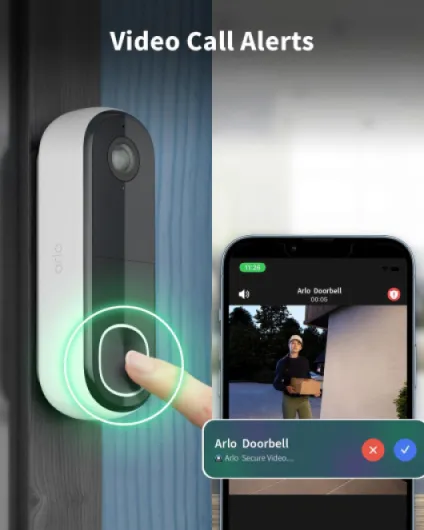
In daily use, the doorbell does what it’s supposed to do: it records when someone comes to the door, it sends alerts to your phone, and you can talk to people from wherever you are. The direct call to your phone when someone presses the button is actually one of the better parts. You don’t have to wait for the app to load; it rings like a normal call, you swipe, and you’re talking to the person at the door. That bit feels genuinely practical.
On the downside, setup is not as smooth as the marketing makes it sound. If you’re used to smart home gear, you’ll manage, but the paper instructions are pretty light. I had to look up a YouTube video to be sure I wasn’t missing steps. And based on the Amazon reviews, I’m not the only one who ran into a bit of confusion when pairing and re-pairing devices or trying to share access with another phone.
Overall, my first impression was: good hardware, average onboarding, subscription-heavy. If you’re okay with paying a few quid a month and you don’t mind digging through an app to tweak settings, it’s a decent option. If you want something simple, truly plug-and-play, and free to run, you might get annoyed pretty fast.
Is it worth the money once you factor in the subscription?
This is where things get a bit tricky. As a one-off purchase, the Arlo 2K HDR Video Doorbell sits in the mid-to-high price range for video doorbells. For that price, you get good image quality, wide field of view, flexible power options, and a decent app. On its own, that’s not bad. The problem is that a big chunk of what makes it interesting – AI detection, cloud storage, SOS features, theft replacement, smarter notifications – is locked behind a monthly subscription.
If you accept that you’ll pay roughly the price of a coffee or two per month, the value becomes more reasonable. You get cloud storage, so your footage is safe even if the doorbell is stolen or broken. You also get better detection (people vs cars vs packages) which reduces useless alerts and makes the camera more practical day to day. In that setup, the doorbell feels like a complete security tool rather than just a camera stuck to your wall.
If you refuse to pay the subscription, the equation changes a lot. Yes, it still records and you can still view live video and get basic motion alerts, but you’re not really using what you paid for. In that case, cheaper doorbells with local storage or simpler features might offer better value. Also, some competitors give you more free features out of the box, even if their app or image quality is a bit behind.
So in terms of value for money, I’d put it like this: if you’re okay with paying monthly and you actually use the smart features, it’s good value but not a bargain. If you want a one-time purchase with no ongoing costs, it’s not the best choice. The hardware is solid and the software is rich, but the business model is clearly built around the subscription, and you feel that quite quickly after installation.
Design: looks decent, feels light but not cheap
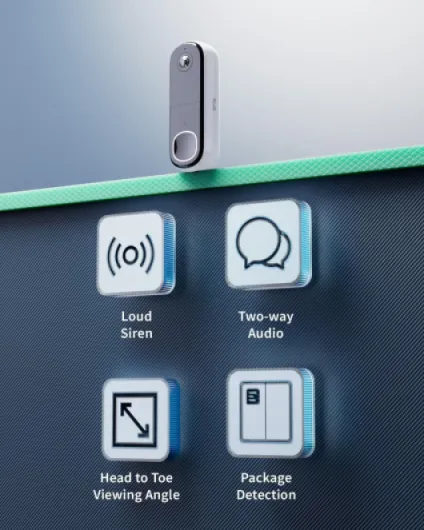
Design-wise, the Arlo 2K doorbell is pretty straightforward. It’s a tall, rectangular unit (about 143 x 47 x 37 mm) in white, with a central camera and a button. It’s not some design object you’ll stare at all day, but it doesn’t look ugly on the wall either. If you already have white frames or a light-coloured facade, it blends in fairly well. It’s clearly plastic, but it doesn’t feel like a toy.
The material is polycarbonate, which is standard for this type of product. It’s light (around 200 g), which actually helps for mounting because it doesn’t put much strain on the screws or the wall. The IP65 rating means it can handle rain and dust outdoors, and I’ve had no issues with it staying in place or taking a bit of wind and bad weather. It doesn’t feel premium, but it feels good enough for outdoor use.
The mounting system is fairly simple: a base plate, an angled bracket if you need to tilt it, and a screw kit. Once the plate is fixed, the doorbell clips on and can be released with a small pin (included). It’s not Fort Knox, but it’s reasonable. If someone really wants to rip it off, they probably can, but that’s the case with most doorbells. At least Arlo offers theft replacement if you’re on their paid plan, which is a small comfort.
What I would flag is that the printed documentation for mounting and setup is bare-bones. The physical part (drill, screws, plate) is fine, but as soon as you hit the software side – pairing, Wi-Fi, app – you’re basically pushed into the app with minimal guidance. If you’re used to QR code setup flows, it’s manageable. If not, it feels half-explained. Overall, the design is practical and discreet, nothing fancy, but it fits the job.
Battery life and power options: not bad, but not plug-and-forget
This model can run wire-free on battery or be hardwired, which is one of its better points. I used it on battery, because I didn’t feel like calling an electrician. Realistically, with average use (a few motion events and doorbell presses per day), the battery seems to last in the region of 2–3 months for me. Some reviewers say they get 3–4 months, which sounds about right if motion recording isn’t going off constantly.
The doorbell charges via a USB cable (included). You have to unclip it from the base, bring it inside, plug it in, and wait. It’s not a huge deal, but it does mean your doorbell is offline for a while unless you have a backup bell or you charge it during a time you’re usually home. If your entrance is very busy (lots of people passing, street-facing, etc.), expect the battery to drain faster. Motion detection, frequent recordings, and live streaming obviously chew through power.
If you can hardwire it, that’s clearly the more comfortable option: no need to worry about charging, and you just let it run. But that assumes you already have doorbell wiring or you’re ready to install some. For renters or people who don’t want to drill too much, battery mode is easier but slightly more annoying long-term. You have to remember to charge it before it dies, otherwise you end up with a dead doorbell for a bit.
Overall, I’d say the battery life is pretty decent but not outstanding. It’s in line with other smart doorbells I’ve tried. If you manage motion zones properly and don’t live-view constantly, it’s fine. If you expect to charge it once and forget it for half a year, you’ll probably be disappointed. The flexibility of choosing between battery and hardwire is a plus, but Arlo could make the charging process a bit smoother, for example with a removable battery pack or an easier clip system.
Build quality and reliability over time
In terms of build, the Arlo doorbell feels solid enough for outdoor use without feeling particularly premium. The polycarbonate shell is standard, and the IP65 rating means it’s protected from dust and low-pressure water jets. In plain language: it handles rain, wind, and typical outdoor grime without complaining. Mine has gone through some wet weather and temperature changes and hasn’t shown any cracks, water ingress, or weird behaviour linked to the environment.
The question of durability is more about software reliability and connectivity than physical wear. Some Amazon users complain about pairing issues, devices going offline, or struggling to re-add the doorbell after changing phones. I haven’t had anything that bad, but I did notice that if your Wi-Fi is a bit weak at your front door, the doorbell will act up: delays, missed notifications, or the live view taking ages to load. So the reliability really depends on having a stable and decent Wi-Fi signal at the door.
Arlo backs it with a 2-year manufacturer warranty and, if you’re on their secure plan, theft replacement. That’s reassuring, but it doesn’t magically fix the frustration if the app or pairing process messes up. The hardware itself doesn’t feel fragile; the mounting bracket holds well, and the doorbell doesn’t wobble or feel like it’s about to fall off. The vandal-proof claim is a bit optimistic in my view – it’s still a plastic box on a wall – but it will survive normal knocks and bumps just fine.
So from a durability angle, I’d say: physically robust enough, software a bit more hit and miss. If you’re comfortable with occasional app updates, reboots, or re-adding a device if needed, you’ll be fine. If you want something that you install once and never touch again for five years, this might irritate you, not because it breaks, but because the software side isn’t perfect.
Image, motion detection and app: how it actually performs
In daily use, the video quality is the main strong point. The 2K HDR (1440p) image is sharp enough to clearly see faces, clothing, and packages. The 180° view gives you the full person from head to toe plus the doorstep. During the day, the picture is clean and the HDR does help when the sun hits the background or when the entrance is half in shadow. It’s not cinema-level, but for a doorbell, it’s more than enough to recognise people and see what’s going on.
Night vision is decent, but not mind-blowing. It uses infrared and gives a clear enough view within the quoted range (around 7–8 metres). You can see who’s there and what they’re doing, but details like number plates at a distance are hit and miss. Some users on Amazon found the night vision a bit underwhelming, and I’d agree it’s good but not crazy good. It gets the job done, but if your entrance is very dark and large, don’t expect miracles.
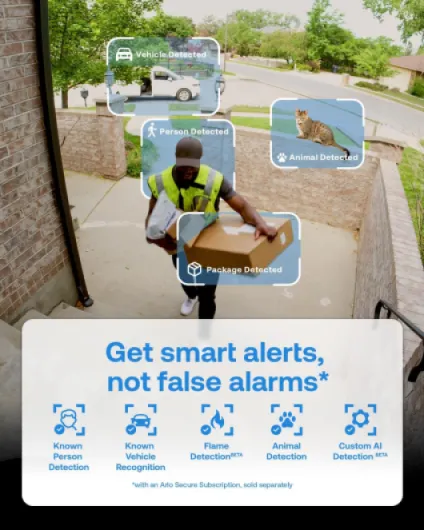
Motion detection is where the subscription comes into play. With Arlo Secure, you get smart detection (people, parcels, vehicles, etc.) and fewer useless alerts from leaves or shadows. Without it, you get more basic motion alerts and you’ll probably need to tweak zones and sensitivity to reduce spam notifications. The app is fairly rich in options – zones, schedules, geofencing (arm/disarm based on your location) – but that also means you can easily get lost in menus if you’re not patient.
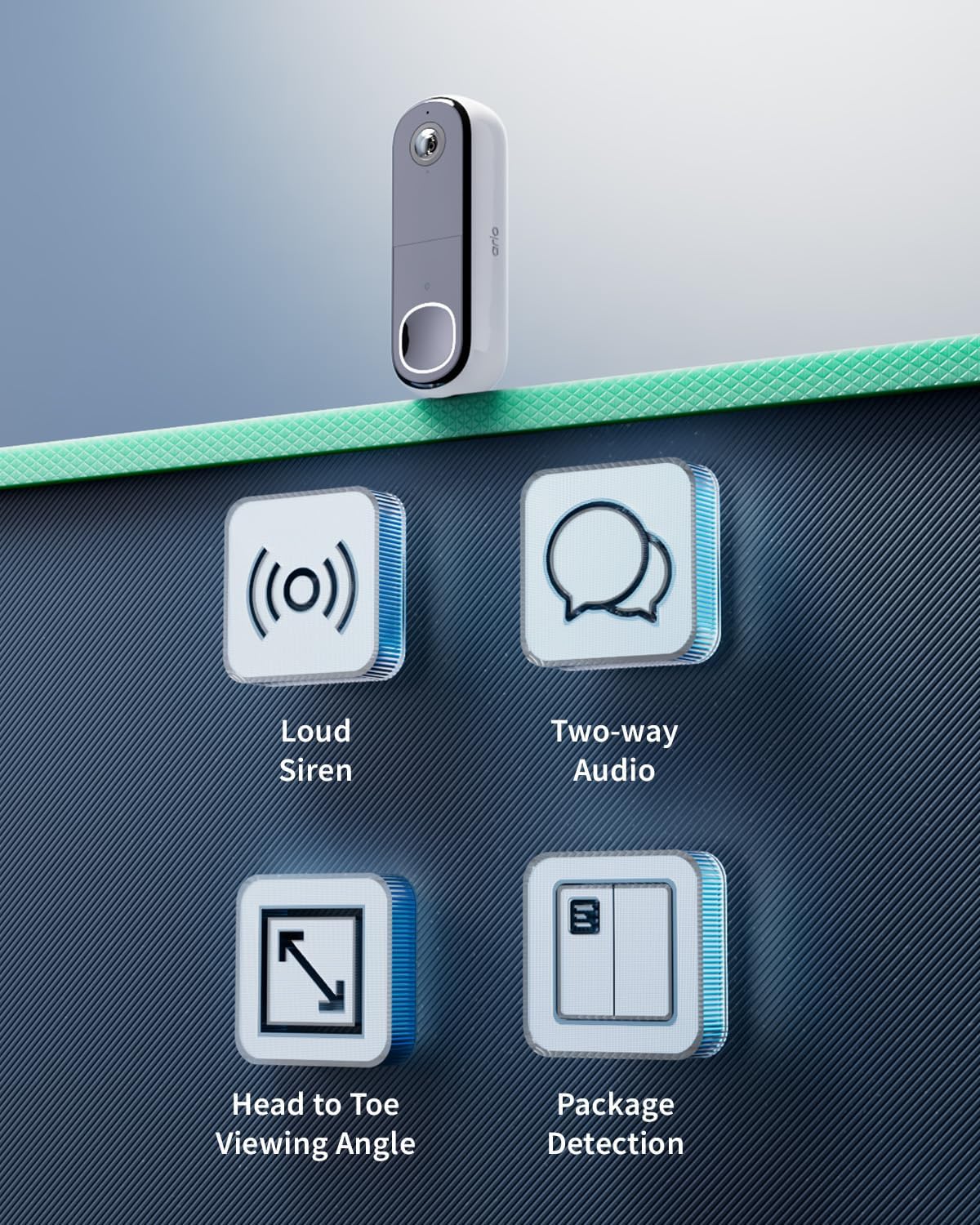
The direct call feature when someone presses the bell is genuinely handy. Instead of a push notification that you might miss, your phone rings like a call and you just swipe to answer. The 2-way audio works fine, with a bit of delay like most IP cameras, but clear enough to tell a delivery driver where to leave a parcel. The siren is loud (around 80 dB) and can be heard from a decent distance, but it’s more of a deterrent than a real alarm. Overall, performance is solid when everything is set up right, but the learning curve and subscription requirement take away some of the shine.
What this doorbell actually offers in real life
On paper, the Arlo 2K HDR Video Doorbell packs a lot: 2K HDR video (1440p), 180° field of view, night vision, 2-way audio, siren, smart detection (people, vehicles, packages, etc.) and cloud storage if you pay for Arlo Secure. In practice, the core that really matters is: can you clearly see who’s at your door, does the app alert you in time, and does it work consistently without you having to babysit it.
The 180° head-to-toe view is actually useful. Compared to more basic 1080p cameras I’ve tried, you genuinely see more of the person, plus the package on the floor. No need to tilt the camera or mount it in a weird spot. It records in MP4 at 24 fps, which is smooth enough to see what’s happening without it looking choppy. The HDR helps when your entrance is backlit (bright outside, darker inside), so you don’t just get silhouettes.
Where it gets a bit less fun is the dependency on the subscription. Yes, it technically works without it, but all the stuff Arlo pushes in the description – smart motion detection, AI for people/vehicles/packages, cloud storage, Early Warning System, SOS button – that’s tied to a paid plan. You can get some basic motion alerts and live view, but the value of this doorbell clearly sits in the paid features. If you’re not up for ongoing costs, you’re not getting the main selling points.
One thing I did like is that it plays fairly well with other systems: Alexa, Google Home, SmartThings, IFTTT, and some support for Apple Home if you have a hub. If you already have a smart home setup, this doorbell fits in without too much drama. But if you’re not into tech and just want something simple, the combination of app settings, smart home links, and subscription options can feel like overkill for what is basically a doorbell with a camera.
Pros
- Sharp 2K HDR image with wide 180° head-to-toe view, good for seeing people and packages clearly
- Flexible power options (battery or hardwired) and weather-resistant IP65 build for outdoor use
- Direct phone call when someone rings and decent 2-way audio make answering the door remotely practical
Cons
- Most of the useful smart features (AI detection, cloud storage, SOS, theft replacement) require a paid subscription
- Setup instructions are light and the app can be confusing for non-technical users, with some reports of pairing issues
- Night vision and battery life are decent but not outstanding compared to some competitors at similar prices
Conclusion
Editor's rating
The Arlo 2K HDR Wireless Video Doorbell is a good fit for people who care about clear video, smart alerts, and app control, and who don’t mind paying a monthly subscription. The 2K HDR image, wide 180° view, and direct call to your phone when someone rings are genuinely useful in everyday life. Paired with Arlo Secure, you get more precise motion detection, cloud storage, and some extra safety features like the SOS button and theft replacement. If you already have other Arlo cameras or a smart home setup with Alexa or Google Home, it slots in quite nicely.
On the flip side, it’s not the most user-friendly product for beginners. The paper instructions are thin, the setup is more app-driven than guided, and some users run into pairing or connectivity problems, especially with weaker Wi-Fi. The subscription model is also something you really need to accept upfront; without it, you’re paying for hardware that doesn’t fully show its strengths. Battery life is decent but not incredible, and night vision is fine but not top-tier.
If you want a flexible, feature-rich doorbell and you’re okay with ongoing costs and a bit of tech tinkering, this is a solid option. If you’re after something cheap, simple, and subscription-free, or you hate dealing with apps and settings, you’ll probably be happier with a more basic model from another brand.