
Summary
Editor's rating
Value for money vs easier but more limited options
Industrial look, solid build, but not exactly friendly
What’s in the box and first setup impressions
Weather resistance and long‑term reliability
Video, app, and keypad: strong potential, a few headaches
What this thing actually does (once it’s set up)
Does it actually solve the “gate/door access” problem?
Pros
- Solid metal build with weather resistance, suited for gates and outdoor use
- Controls two locks/gate relays with keypad, permanent and temporary codes, and app unlock
- Good value compared to pro intercom systems with similar features; responsive and helpful support
Cons
- Documentation is vague and sometimes inaccurate, setup can be confusing
- App/server reliability and notification delays reported by some users, especially over Wi‑Fi
- Keypad can be finicky and programming logic isn’t intuitive for non‑technical users

Specifications
View full product page →| Brand | GBF |
A smart gate intercom that’s powerful but not plug‑and‑play
I’ve been using the GBF Smart Video Door Phone & Doorbell Intercom (model PL963PM‑POE) as a gate intercom, not just a front-door gadget. In my case it’s wired through Ethernet, controlling a gate lock, and paired with the Doordeer / ControlCam2 app on iPhone and Android. So this is coming from someone who actually had to live with it, not just unbox it and say “looks nice”.
Right away, this thing feels more like a small security system component than a consumer toy like Ring or Nest. It’s meant for gates, small apartment entries, or shared driveways where you might need a keypad, video, and the option to control one or two locks remotely. If you’re expecting a super simple, two‑minute app setup like a mainstream video doorbell, that’s not what this is.
What you get instead is a box that can do a lot: PoE support, two lock relays, motion detection, cloud and local recording, a keypad with permanent and temporary codes, and multi‑user app access. But you also get clunky documentation, some quirks with the keypad programming, and an app that clearly wasn’t designed by UX nerds. In short: it’s powerful, but you have to be ready to fight with it a bit.
After a good stretch of use, my feeling is simple: if you’re somewhat technical or don’t mind following wiring diagrams and testing things, it’s a pretty solid value. If you’re not comfortable touching router settings or reading a wiring diagram, it can quickly become frustrating. The hardware is decent, the software is just okay, and support is actually better than I expected, but it is not a casual plug‑and‑play gadget.
Value for money vs easier but more limited options
Price-wise, the GBF PL963PM‑POE usually sits in that middle ground: more expensive than a basic consumer video doorbell, but cheaper than pro‑grade intercom brands like Axis or some DoorBird setups, especially once you add keypads and multiple relays. When you consider that it can handle two locks, video, audio, keypad codes, and app control, the feature-per-dollar ratio is actually pretty good. You’d need multiple devices to match this with some other ecosystems.
Where the value gets debated is the time and hassle cost. If you’re tech‑savvy or already comfortable with gate openers and IP cameras, you’ll probably see it as good value. You pay a reasonable price and invest some hours in setup, then you have a flexible system that does what you want. One reviewer compared it directly to Grandstream: similar price, but Grandstream required deeper VoIP and server knowledge, so they ditched that and stuck with GBF because it was closer to plug‑and‑play for them.
If you’re not technical, the curve is steeper. The manual is widely criticized: vague instructions, missing explanations of why certain steps matter, and barely any mention of things like the external antenna. More than one buyer said they got it working only after “trial and error” and emailing support. If you end up hiring an installer or spending days debugging, the “good value” starts to look less good.
Overall I’d say: for the right user, the value is solid. You get serious gate/door control features for less money than a lot of pro gear. For the wrong user, it’s a headache in a metal box. If you want something you can hand to your parents to install themselves, this isn’t it. If you’re comfortable with wiring diagrams and maybe a call or two to support, the price makes sense for what it can do.

Industrial look, solid build, but not exactly friendly
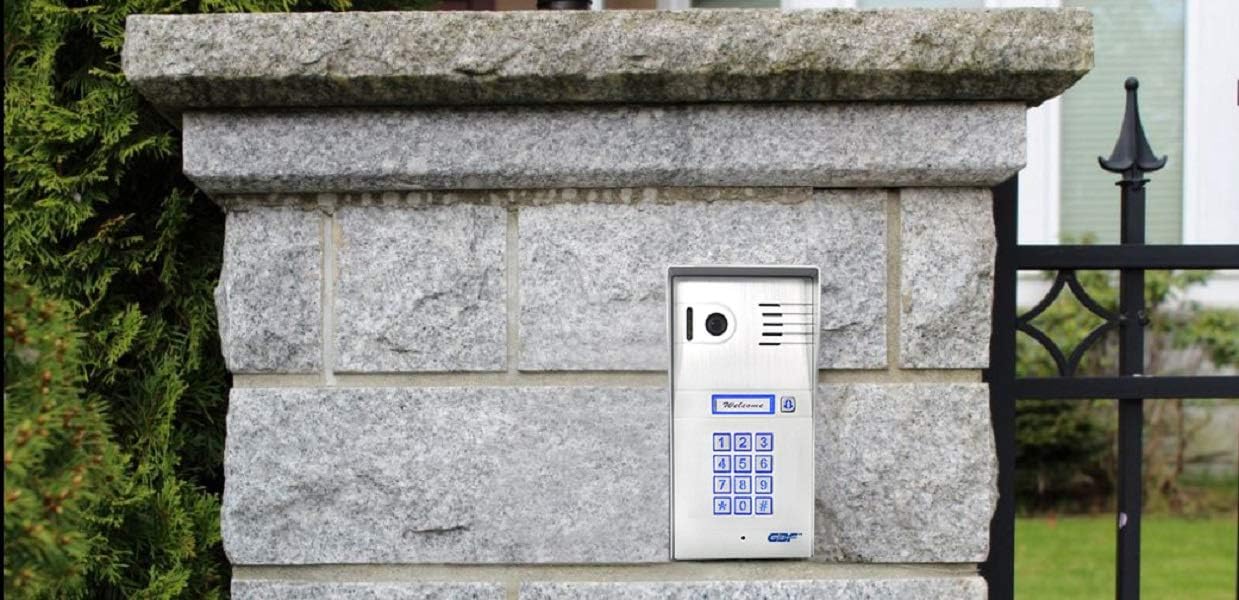
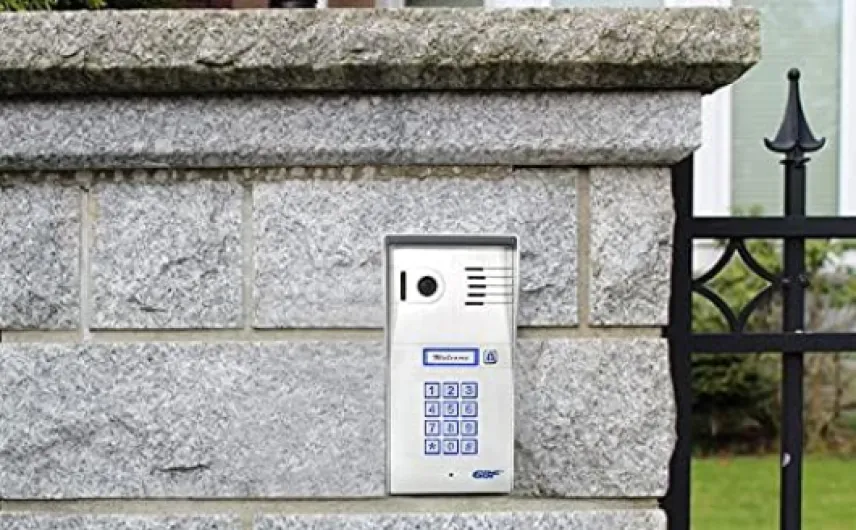
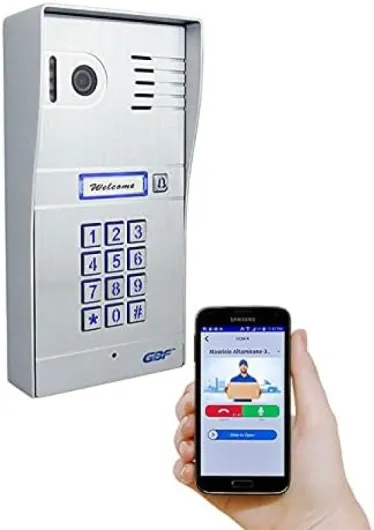
Design-wise, this thing looks like something you’d see at the entrance of a small office or gated community, not a cute smart home gadget. The brushed aluminum alloy faceplate feels solid, and the whole unit has a kind of industrial vibe. It’s not ugly, but it’s clearly built for function more than style. Size-wise, at about 21 x 10.2 x 5.1 cm, it’s taller and chunkier than a Ring doorbell, so you need a bit of space on the post or wall.
The keypad is capacitive (touch-based), not mechanical. That’s good for weather and wear, but it’s a bit finicky. Several users, and I’d agree, said you have to be deliberate when pressing the numbers. If you rush, it might not register or might double-tap. For a gate keypad, that’s mildly annoying: you end up re‑entering codes if you go too fast. The blue backlight is handy at night, but again, it looks more like security hardware than a polished smart-home product.
On the back and inside, it’s all business: terminals for locks, power, Ethernet, and sometimes a separate Wi‑Fi antenna connector. One user pointed out that the little external Wi‑Fi antenna works well, but the manual barely mentions it, and the housing has no clean spot to mount it, so he drilled a hole and sealed it with silicone. That kind of sums up the design: hardware is capable, but you’re expected to improvise a bit.
One more small but real point: edges. At least one buyer complained about sharp metal edges and even cut fingers during installation. I didn’t slice myself, but I can see how it could happen if you’re not careful. This is not soft, rounded plastic. Overall, the design is sturdy and practical, but it doesn’t hold your hand. If you like robust, you’ll be happy; if you want something sleek that disappears into your facade, this might feel a bit harsh.
What’s in the box and first setup impressions
Out of the box, the GBF unit feels like a proper piece of hardware, not a toy. You get the main intercom/keypad unit, the back box for mounting, a power adapter, and the basic wiring connectors. There’s enough in there to do a straightforward install if you’re running separate power and Ethernet. Where things get confusing is around PoE and accessories. The Amazon listing talks about PoE, but at least one buyer pointed out that the PoE adapter shown in some photos wasn’t actually included, and they had to buy a separate injector and splitter to make PoE work. So don’t assume all the PoE bits come in the box; check carefully.
The printed manual is the weak link. It covers the basics, but doesn’t really explain the logic behind settings or give good diagrams for more complex installs like gates with third‑party openers, dual locks, or external chimes. One reviewer said the documentation was “less than vague”, which sums it up pretty well. For example, the external Wi‑Fi antenna is barely mentioned, and there’s no clear suggestion on where or how to mount it. Another user had to figure out keypad programming mostly by trial and error, and only cracked it after several emails with support.
First setup also depends heavily on which firmware and app combo you get (Doorbell2 + ControlCam2, or Doordeer). The newer combinations are better, but the instructions don’t always match exactly what you see on screen. The manual also had at least one outright error about keypad slots 31–40, which GBF later corrected in firmware but not in the printed booklet right away. That kind of mismatch is annoying when you’re standing at a gate trying to program codes.
So my take: packaging is fine, documentation is not. The hardware arrives protected and looks professional; you’re not dealing with flimsy parts. But be ready to supplement the manual with YouTube videos, support emails, or just patience. If you go in expecting a detailed, idiot‑proof guide, you’ll be disappointed. If you accept that you’ll need to poke around a bit, you can get there without too much pain, especially if you use Ethernet instead of trying to be clever with Wi‑Fi right away.
Weather resistance and long‑term reliability
In terms of physical durability, the GBF PL963PM‑POE is pretty solid. The brushed aluminum panel and all‑metal back box feel sturdy, and the IP55/IP65 weather rating seems realistic. Users have had these mounted on gates and posts outdoors, exposed to rain and sun, and the housing itself holds up fine. The buttons don’t fade quickly, and the blue backlight is still visible after months outside. It doesn’t feel like cheap plastic that will crack after one winter.
Where durability gets more mixed is on the electronics and firmware side. There are a few reports of units locking up or partially failing after a year or so. One person had their original unit freeze; GBF replaced it under the two‑year warranty, which is good, but then the replacement later had software issues (video not working in the official app, only through a third‑party app). That’s the kind of stuff that makes you less confident about long‑term reliability, even if the metal shell is fine.
The good news is that GBF seems to stand behind the hardware. Several reviewers mention dealing with Ray or other staff who actually respond, send replacement boards, or even upgrade customers to newer versions at a discount or for free when a design flaw was fixed (like the wired chime output returning in a newer revision). So at least you’re not stuck with a dead box and no one answering emails. Still, needing board swaps and firmware tweaks isn’t ideal if you just want something you can forget about.
From what I’ve seen, if you install it properly—sealed connections, correct power, maybe PoE instead of random adapters—it should physically last. Just be ready for the possibility of a firmware update, a bit of troubleshooting, or even a warranty claim down the line. It’s not junk, but it’s not bulletproof either, especially on the software side.
Video, app, and keypad: strong potential, a few headaches
On the performance side, the story is very split between wired and wireless. With a hard‑wired Ethernet or PoE setup, the system behaves pretty well. One user was running it 500–600 feet away through a point‑to‑point wireless bridge and still got rock‑solid video and audio with very little lag. In my own use on Ethernet, calls came through reliably and remote unlock commands fired quickly. The newer firmware (Doorbell2) and ControlCam2 app are noticeably better than the older generation, with faster notifications and improved video.
Camera quality is decent. It’s 1080p with a 160° field of view, and for a gate or front door, that’s enough to clearly see faces and vehicles. The wide angle is useful, though like most wide lenses, things at the edges can look a bit stretched. Night performance is okay but not mind‑blowing. It relies on built-in LEDs for low light; you get usable color video in dim conditions, but don’t expect full-on security camera performance in complete darkness unless there’s some ambient light around.
Where performance gets messy is network dependency and the keypad logic. The system calls out to GBF’s servers, and at least one long-term user reported serious issues: delayed alerts by minutes, hours, even days, and random notifications in the middle of the night. In that case, they ended up disabling the doorbell function entirely and just using it as a gate controller, which kind of defeats half the purpose. Another person had a unit fail, got a warranty replacement, then had app issues again later. So reliability depends a lot on your network and on GBF’s backend staying stable.
The keypad itself works, but programming it is clunky. Earlier firmware required keypad-only programming with weird slot behavior (codes in slots 31–40 acting as permanent toggles instead of short pulses). Newer firmware and the newer app let you manage codes directly from your phone, which is much nicer, but the learning curve is still steeper than it should be. When it’s finally dialed in, it does the job well: open gates, timed unlocks, codes for guests, etc. Just don’t expect a smooth, polished experience from day one.
What this thing actually does (once it’s set up)
The GBF PL963PM‑POE is basically a video intercom with a keypad and two lock relays. You mount it at your gate or front door, hook up Ethernet (or Wi‑Fi if you insist), and wire it to one or two locks, gate openers, or magnetic strikes. Then you use GBF’s app (ControlCam2 / Doordeer, depending on firmware) to see who’s there, talk to them, and unlock remotely. The keypad lets you create access codes so people can get in without calling you.
On paper it’s stacked: 1080p camera, 160° field of view, night vision, IP55/IP65 weather rating (depending on the listing), motion detection with alerts, local and cloud recordings, and the ability to share access with multiple phones. You can generate permanent and temporary PIN codes from the app, which is handy if you have cleaners, delivery drivers, or tenants. Some buyers have used it with GTO / Mighty Mule gate openers and similar gate controllers without major drama, as long as they understand the wiring (normally open vs normally closed).
In practice, the feature set is strong but the experience is uneven. The wired users (Ethernet or PoE) usually report solid performance and decent reliability, especially after firmware updates. Wi‑Fi users are more mixed: some say it’s fine, others complain about delayed notifications or connection issues. One reviewer flat out said they had doorbell alerts coming in hours or days late when the GBF servers were struggling, which is pretty bad if you’re relying on it for visitors. So yes, it can work, but it’s not bulletproof in every setup.
If you treat it like a small security system component and plan a proper wired install, it starts to make sense. If you’re thinking “I’ll just stick it by the door and let Wi‑Fi handle everything,” you might be disappointed. It’s more of an installer‑type product that happens to be sold on Amazon, not a pure consumer toy with hand‑holding at every step.
Does it actually solve the “gate/door access” problem?
When you look past the specs, the main question is: does this thing actually make gate or door access easier? For me, and for a good chunk of the positive reviews, the answer is yes, with conditions. If you wire it correctly and your network is stable, it really does simplify life. You can see who’s at the gate, talk to them, and pop the lock from your phone. You can give friends, family, tenants, or delivery people codes instead of sharing a physical key or being home every time.
One user who replaced a basic GTO / Mighty Mule keypad with this was clearly happy. They could now trigger the gate open/close cycle from the app, use short pulses for normal operation, and even program special codes that hold the gate open when needed. They called the solution “extremely reliable” once they got through the initial keypad programming headaches. Another buyer upgraded from the 2nd gen GBF unit and said the new version fixed their main issues: faster app response and a better camera, plus eventually restored support for a traditional wired doorbell chime after GBF updated the board.
On the other hand, there’s that one very unhappy customer who basically said the device never behaved as advertised: required external servers, had constant notification delays, and eventually failed multiple times even after a warranty replacement. They ended up using another device for gate control and plan to replace the GBF with a normal keypad and a separate camera. That’s the worst‑case scenario, but it’s worth mentioning because it shows this is not foolproof.
So in terms of effectiveness: it can absolutely solve the problem it’s supposed to solve, but only if you’re willing to: 1) wire it properly (ideally Ethernet/PoE), 2) spend time understanding the settings and firmware, and 3) accept that the app and servers are not at the same level of polish as bigger brands. If you tick those boxes, it’s genuinely useful. If you want pure plug‑and‑play and never think about it again, you might be happier with a simpler system, even if it means giving up some of the advanced control.
Pros
- Solid metal build with weather resistance, suited for gates and outdoor use
- Controls two locks/gate relays with keypad, permanent and temporary codes, and app unlock
- Good value compared to pro intercom systems with similar features; responsive and helpful support
Cons
- Documentation is vague and sometimes inaccurate, setup can be confusing
- App/server reliability and notification delays reported by some users, especially over Wi‑Fi
- Keypad can be finicky and programming logic isn’t intuitive for non‑technical users
Conclusion
Editor's rating
Overall, the GBF PL963PM‑POE is a capable but demanding smart video door phone. The hardware is sturdy, the feature list is long (two lock relays, keypad, 1080p camera, app control, motion alerts), and when wired properly the system can be very reliable. It fills a niche that Ring, Nest, and other mainstream doorbells don’t really cover: gates and doors where you need real access control, not just a camera and a chime.
The trade‑off is that it’s not very beginner‑friendly. The manual is weak, the app and firmware can be quirky, and you may run into oddities like keypad programming weirdness or delayed notifications if your network or GBF’s servers act up. Support seems genuinely helpful and willing to replace boards or units, which softens the blow, but you still need a bit of patience and a basic comfort level with wiring and network settings. If that sounds fine, the value is good and the product gets the job done. If you want something totally painless and polished, there are simpler options, even if they’re less flexible.