
Summary
Editor's rating
Is it good value compared to consumer doorbells and pro systems?
Industrial look, functional layout, zero “wow” factor
Build quality, weather resistance, and how it feels long-term
Video, audio, and app: solid once set up, but not idiot-proof
What you actually get in the box and what it can (and can’t) do
Day-to-day use: does it actually make access easier and safer?
Pros
- Both indoor monitor and outdoor camera powered via PoE, so one Ethernet cable handles power and data
- Clear 1080p video with decent night vision and wide field of view for identifying visitors
- Works with Hik-Connect app and supports multiple indoor monitors without extra subscription fees
Cons
- Setup and configuration are not very beginner-friendly, especially for non-technical users
- Design and interface feel basic and a bit dated compared to consumer smart doorbells

Specifications
View full product page →| Brand | 318netech |
A wired video intercom that doesn’t try to be fancy, just practical
I’ve been using this KIS603-P wired PoE IP video intercom for a few weeks now on a small office entrance, and I’ll be straight: it’s not flashy, it’s not “smart home chic”, but it does its job in a pretty solid way. If you’re expecting a plug‑and‑play gadget like a consumer Ring doorbell, you might be a bit surprised. This one feels more like something you’d see in a small business or an apartment building than in a trendy living room. That’s not a bad thing, just a different target.
The main thing that pushed me to try it was the PoE (Power over Ethernet). I already had network cables running to the entrance, so being able to power both the indoor monitor and the outdoor camera over Ethernet, without messing with mains wiring, was a big plus. No electrician, just a PoE switch and some patience. In that sense, it’s clearly geared towards people who aren’t scared of logging into a router or setting IP addresses.
In daily use, the system is pretty straightforward: someone presses the button outside, the indoor 7‑inch screen lights up with video, you talk to them, and if your door lock is wired in, you can let them in. You also get notifications on your phone via the Hik-Connect app. It feels more like an access control system than a toy gadget. Compared to the old audio‑only intercom we had, this is a clear upgrade: we can actually see who’s there, including delivery drivers, and decide if we bother getting up.
It’s not perfect though. The interface looks a bit old‑school, the setup is not idiot‑proof, and you need to be comfortable with the idea that this is basically a Hikvision-based kit with the usual Chinese-style documentation. But if you accept that, the core functions (video, audio, notifications) are reliable. So this review is from that angle: not as a showroom piece, but as a tool you install once and hope you don’t have to touch too often.
Is it good value compared to consumer doorbells and pro systems?
On the value for money side, this kit sits in a middle ground. It’s usually cheaper than high-end branded access control systems, but more expensive than basic WiFi doorbells from big consumer brands. For the price, you get PoE support for both monitor and camera, a 7-inch screen, 1080p video, night vision, and app control. If you compare that to what you’d pay an installer to replace an old intercom with a similar pro-grade system, this looks pretty attractive. You do some of the setup yourself and save on labour.
Where it really shines in terms of value is for small offices, rental buildings, or multi-room setups. Being able to add extra monitors relatively easily, use existing Ethernet cabling, and manage everything through one app is worth quite a bit. The fact that you don’t have to buy a separate power supply or proprietary hub is another money saver, assuming you already own or are willing to buy a small PoE switch. If you’re starting from zero and need to buy cables, tools, and a switch, the total cost climbs, so keep that in mind.
On the downside, there’s no glossy user experience here. The interface is a bit bare, the manual is functional but not super clear, and setup can eat a couple of hours if you’re not used to networked devices. Some cheaper cloud-based doorbells give you an easier user experience out of the box, but then hit you with subscription fees or weaker hardware. Here, once you’ve paid, you basically own the system and local recording, with no monthly costs.
So overall, I’d call the value pretty solid for tech‑savvy users or small businesses, and just “okay” for someone who wants pure plug‑and‑play convenience. If you’re comfortable with PoE and basic networking, you get a lot of functionality for the price. If you’re not, you might be better off spending the same money on a simpler consumer doorbell, even if the hardware itself is a bit less serious.
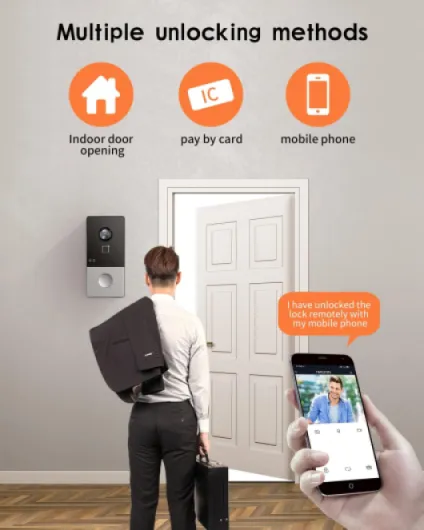
Industrial look, functional layout, zero “wow” factor
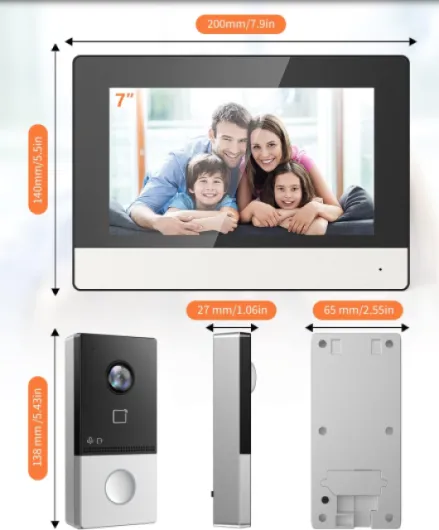
Design-wise, this kit is very much on the practical side. The indoor monitor is a flat, rectangular slab with a 7-inch screen, a few touch buttons on the side, and a thin bezel. It’s not ugly, it’s just plain. If you’re used to glossy Nest or Ring products, this will feel more like something pulled from an office building than a living room. For a hallway or an entrance area, I actually don’t mind that. It doesn’t scream for attention, it just sits there and works.
The outdoor doorbell unit is similar: compact, dark, and utilitarian. Camera at the top, button at the bottom, microphone and speaker hidden in small grills. The button has a decent click—people know they pressed it. There’s no glowing ring or fancy LED animation, just a basic indicator. One practical thing I liked: the camera angle and wide field of view mean you can mount it slightly to the side of the door and still see people clearly. It’s not fussy about placement as long as you’re roughly at head height.
Cable management is straightforward: RJ45 port on both units, and that’s it. No dangling power bricks or extra wires for basic use. If you want to hook up an electric strike or door release, then you’ll need to deal with extra wiring, but that’s normal for this type of system. The backplates are simple metal or plastic plates that you screw to the wall, then clip the units onto. Nothing fancy, but secure enough once properly fixed.
To sum it up, the design is all function, no decor. If you want something that blends into a modern, designer interior, this won’t impress you visually. But if you care more about having a clear screen, a usable button, and a layout that makes sense, it’s totally fine. It looks like what it is: a small piece of security hardware, not a lifestyle object.
Build quality, weather resistance, and how it feels long-term
Durability is always tricky to judge after just a few weeks, but there are some clear signs here. The outdoor unit is rated IP65, which means it’s dust-tight and can handle low‑pressure water jets. In plain terms: rain, snow, and general bad weather shouldn’t be a problem. I had it mounted outside exposed to several heavy rains, and it didn’t flinch. No condensation inside the lens, no weird fogging, and the button still clicks like day one.
The materials feel more like commercial gear than cheap plastic gadgets. The front panel of the outdoor unit has a solid feel; it doesn’t flex when you press the button. The indoor monitor is lighter and more plasticky, but the casing is tight, and the screen hasn’t shown any weird backlight issues so far. It’s the kind of build you’d expect from a mid-range professional intercom, not a toy. Not premium, but reassuring enough that you don’t feel like it will fall apart if someone slams the door.
Another point for durability is the wired PoE design. No batteries to replace, no power adapters dangling from outlets. Once your cables are in the wall and your PoE switch is stable, there’s very little to go wrong. Compared to WiFi-only doorbells that depend on signal strength and random power bricks, this feels more “install once and forget”. The only real moving part is the doorbell button, and that seems decently built.
Long term, the main risk is probably software and app support, not the hardware itself. If Hik-Connect or firmware support ever stops, you’d still have local intercom functions on the monitor, but remote access could become flaky. For now, everything works as advertised. Hardware-wise, I’d rate durability as good for the price: not bulletproof industrial-grade, but clearly above cheap no-name imports that crack or fade in the sun after a year.
Video, audio, and app: solid once set up, but not idiot-proof
In terms of video quality, the 2MP 1080p camera does a decent job. Faces are easy to recognize, even in average lighting. The 120 dB WDR helps with backlighting: when someone stands in front of a bright background, you can still see their face instead of a dark silhouette. It’s not cinema-grade, but for security and access control, it’s more than enough. The IR night vision out to around 3 meters is accurate; in my tests, I could clearly see people at the door at night, but you don’t get much detail further back in the driveway.
Audio performance is okay. The speaker on the outdoor unit is loud enough that visitors hear you clearly, even in a moderately noisy street. The microphone picks up voices fine, but you do get a bit of echo and that typical intercom “boxy” sound. It’s usable, just not crystal clear. Indoors, the monitor’s speaker is loud enough that you’ll hear it from the next room. I’d say the audio quality is on par with mid-range office intercoms: not pretty, but efficient.
Now the Hik-Connect app side: once everything is configured, the notifications and remote answering work reliably. When someone presses the doorbell, my phone buzzes in a couple of seconds, and I can see the live feed and talk back. Latency is acceptable on a normal home/office network. The downside is the initial setup: you need to get the intercom on your network, make sure IP settings are right, and sometimes deal with Hikvision-style device activation and passwords. If you’ve ever set up a Hikvision NVR or camera, it feels familiar. If not, expect to spend some time reading and maybe searching online.
Overall, performance is strong once everything is dialed in. Video is clear, night vision is usable, audio is understandable, and the app does what it says. But I wouldn’t give this to a non-technical relative and expect them to set it up alone. It’s more for people who are comfortable with networking basics or for small businesses that don’t mind a bit of configuration time.
What you actually get in the box and what it can (and can’t) do
Out of the box, you get two main pieces: the 7-inch indoor monitor and the outdoor 2MP doorbell camera unit. Both use RJ45 and can be powered via PoE, which is honestly the biggest selling point here. There’s no chime box, no extra hub, no weird proprietary power brick. You supply your own PoE switch or injector and your own network. That makes it nice if you already have a basic network rack or at least a small switch lying around.
The indoor monitor has a 1024 x 600 touchscreen, which is fine for this use. It’s not tablet-level sharp, but for seeing who’s at the door, it’s more than enough. You navigate a simple menu, access settings, look at snapshots or recordings if you’ve added a TF card (up to 128 GB, not included), and manage calls. The outdoor camera is 2MP 1080p with a quoted 131° horizontal and 78° vertical field of view. In practice, that means you see a good chunk of the area in front of the door, including people who stand a bit to the side.
On the feature side, you’ve got two-way audio, IR night vision, motion detection, and IP65 waterproofing. The motion detection is basic: it can trigger recordings and alerts, but don’t expect fine‑tuned zones like on high‑end cameras. Night vision is rated to around 3 meters, which more or less matches what I saw: you clearly see faces at the door, but not much detail further away. It also hooks into the Hik-Connect app, so you can answer calls and check video from your phone, as long as your network is set up right.
Where it’s clearly not trying to compete is on “smart” extras. No voice assistants, no fancy automations out of the box, no battery backup. It’s a hard‑wired, network‑based intercom first, a “smart gadget” second. If that’s what you’re looking for—something closer to professional access control than a toy—this kit makes sense. If you want flashy features and cloud gimmicks, you’ll probably find it a bit plain.
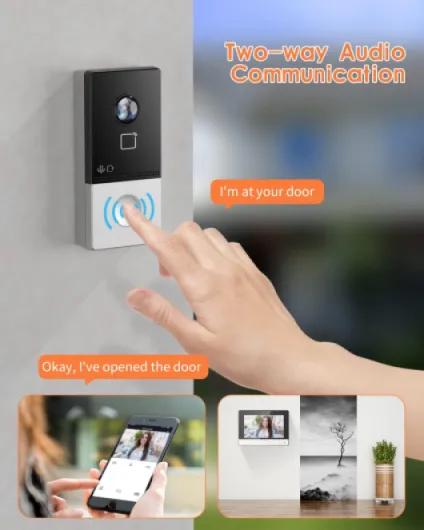
Day-to-day use: does it actually make access easier and safer?
In day-to-day use, this kit mainly needs to do three things: show you who’s at the door, let you talk to them, and optionally control access. On those points, it does the job well. After a couple of weeks, I noticed we were making fewer wasted trips to the door. You see the delivery guy, confirm the package, and either buzz them in (if you wired a door strike) or tell them where to leave it. Compared to the old audio-only system, just being able to see the person’s face is a big quality-of-life upgrade.
The motion detection and recording to a TF card are helpful, but I’d call them “nice extras” rather than the main reason to buy this. Motion alerts work, but they’re not as granular as what you get on dedicated security cameras. If you want a full surveillance system, you’re better off pairing this with separate cameras. As an intercom with some recording capabilities, it’s fine. Snapshots of visitors are clear enough to check who came by while you were away.
One thing I found genuinely useful is the combination of indoor monitor + app. When I’m in the office, I use the monitor—it’s faster and more convenient. When I’m away from the desk or off-site, I use the phone. There’s also support for multiple monitors, and that actually worked well: we added a second screen, plugged it into the network, and it detected the other one after basic configuration. Being able to answer from two offices without extra subscriptions is a clear practical advantage.
So in terms of effectiveness as an intercom system, I’d say it’s pretty solid. It doesn’t try to do everything, but the core functions are reliable: calls come through, video shows up, audio works, and the door can be controlled if wired properly. It’s not the kind of product you’ll play with every day, but once installed, it quietly makes access control simpler and a bit safer.
Pros
- Both indoor monitor and outdoor camera powered via PoE, so one Ethernet cable handles power and data
- Clear 1080p video with decent night vision and wide field of view for identifying visitors
- Works with Hik-Connect app and supports multiple indoor monitors without extra subscription fees
Cons
- Setup and configuration are not very beginner-friendly, especially for non-technical users
- Design and interface feel basic and a bit dated compared to consumer smart doorbells
Conclusion
Editor's rating
This KIS603-P wired PoE IP video intercom feels like a practical, no-nonsense system aimed more at small offices, apartment buildings, and tech‑comfortable homeowners than at people who just want a pretty gadget. The hardware is decent, the PoE setup keeps wiring clean, and the core functions—video, two-way audio, night vision, and app notifications—work reliably once everything is configured. It’s not stylish and the interface won’t impress anyone, but as a tool to see and talk to visitors and control access, it gets the job done without drama.
You’ll get the most out of it if you already have or don’t mind installing Ethernet cables and a PoE switch, and if messing with IP addresses doesn’t scare you. In that case, the system offers good value, especially if you plan to add extra monitors or use it in a multi-office or multi-apartment setup. If, on the other hand, you want something you can just screw to the wall, connect to WiFi, and forget, there are simpler WiFi doorbells out there, even if they’re a bit less robust and more app-dependent.
So, who is it for? People who want a solid, wired intercom with a proper screen, no monthly fees, and don’t mind a bit of configuration. Who should skip it? Anyone allergic to network settings, or those mostly looking for a stylish smart-home accessory instead of a slightly industrial-looking access control system.