
Summary
Editor's rating
Value: great for UniFi users, hard to justify for everyone else
Design: clean look, but clearly built for function first
Durability and build: feels more like pro gear than a toy
Performance: rock solid once it’s on your network
What you actually get with this PoE kit
Effectiveness as a security doorbell
Pros
- Very stable performance thanks to PoE and Ethernet (no Wi‑Fi dropouts)
- Tight integration with UniFi Protect and existing Ubiquiti cameras
- No cloud subscription required; recordings stored locally on your own hardware
Cons
- Expensive, especially if you don’t already own UniFi gear
- Setup and ecosystem clearly not beginner-friendly compared to Ring/Nest

Specifications
View full product page →| Brand | Ubiquiti |
A doorbell for network nerds, not casual buyers
I’ve been using the Ubiquiti UVC-G4 Doorbell Pro PoE Kit for a bit now, and the first thing to say is this: it’s clearly made for people who already live in the UniFi ecosystem, not for someone who just wants a simple Ring-style doorbell. You don’t just plug this thing into a random app and call it a day. It wants UniFi Protect, PoE, and ideally a UniFi NVR or Dream Machine. If that sounds like gibberish, this is probably not the right product for you.
In my setup, I wired it directly with Ethernet using PoE, which is basically its main strength. Once it was on the network, I didn’t have any dropouts, no random disconnects, no “device offline” notifications like I’ve had with Wi‑Fi doorbells. The feed is just there, all the time, and that reliability is really what you pay for with this doorbell. Compared to cheaper Wi‑Fi models I’ve tried, it feels more like a small IP camera that happens to have a button, rather than a toy gadget.
On the flip side, the price is high, and you have to add the cost of the rest of the UniFi gear. If you don’t already own a UniFi Protect recorder or a compatible gateway, the full bill starts to look pretty steep for a doorbell. That’s why a lot of people on Amazon say the same thing: great product if you’re already into Ubiquiti, less interesting if you’re starting from zero. I’m in the first group, so I could drop it right into my existing setup.
Overall, my first impression was: very solid, very “pro”, but not friendly for beginners. If you enjoy messing with networks and want everything wired and under your control, it’s the kind of device that fits that mindset. If you just want to see who’s at the door without thinking about PoE switches or NVRs, there are easier and cheaper options out there that will make more sense.
Value: great for UniFi users, hard to justify for everyone else
Now, on value for money, this is where opinions will split. If you already own UniFi gear – especially a UniFi Protect NVR or a Dream Machine with Protect – the UVC-G4 Doorbell Pro PoE makes a lot of sense. You’re basically adding one more camera to your existing system, with a clean interface and no subscription. In that context, yes, it’s expensive, but it fits nicely into the ecosystem and gives you a reliable, wired doorbell that behaves like the rest of your cameras. For someone like me who already went down the UniFi rabbit hole, the price feels high but acceptable.
If you don’t own any Ubiquiti hardware yet, it’s a different story. Buying this doorbell alone doesn’t solve much; you still need compatible UniFi gear to run Protect and power it properly. By the time you add a PoE switch and a Protect-capable device, you’re looking at a total cost that’s way higher than a standalone Ring or Nest setup. For a lot of people, that just won’t be worth it, especially when simpler doorbells already offer decent performance, built-in chimes, and very easy mobile apps, even if they push subscriptions.
Another point on value: there’s no monthly fee here, which is a big plus in the long run. If you compare five years of a subscription-based doorbell versus this one plus UniFi hardware, the math can actually tilt in favor of Ubiquiti, especially if you also replace other cameras with UniFi ones. But that only makes sense if you’re building a whole system. If you just want a single doorbell and that’s it, the upfront cost of going UniFi is hard to justify.
So, in my view, the value is strong for tech‑savvy users already in the UniFi world, and pretty weak for casual users starting from scratch. There’s better bang for your buck if you want something simple and standalone. If you’re the type who already knows what PoE is and runs multiple VLANs at home, you’ll probably look at the price and say “okay, that’s the cost of doing it my way”. If you’re not, you’ll likely find it overkill and overpriced.
Design: clean look, but clearly built for function first
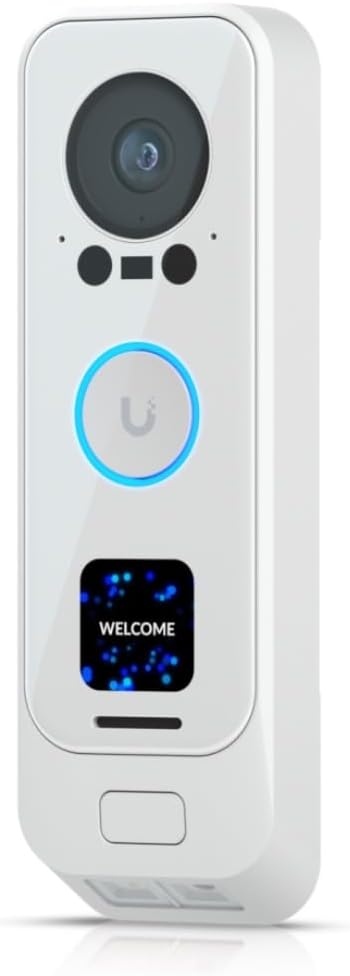
Design-wise, the UVC-G4 Doorbell Pro PoE is pretty clean and modern. Mine is the white kit, but the doorbell itself is basically a black front with a camera and the button area. It doesn’t scream for attention like some big shiny consumer doorbells, and that’s something I actually liked. Mounted next to the door, it just looks like a serious security device, not a toy. The dimensions listed (around 18 × 20 × 11 cm in the spec sheet) feel more like box dimensions than the unit itself; in reality, the doorbell is slimmer and more in line with other video doorbells I’ve used.
The layout is simple: camera on top, button at the bottom, and a decent-sized ring area for people to press. The LED ring is clear enough that visitors understand where to push, even in the dark. Compared to cheaper models I’ve owned, the build feels tighter and less plasticky. There are no weird gaps or flimsy covers. You can tell Ubiquiti builds networking gear first and doorbells second: the whole thing feels like an outdoor IP camera shrunk down to doorbell size.
One thing to note: there’s no big branding or flashy logo on the front. For me, that’s a plus. It looks neutral and fits on different types of facades without clashing too much. If you’re into the Apple-style, glossy look, this won’t impress you, but if you just want something that looks serious and doesn’t draw too much attention, it does the job. It’s also less “steal me” looking than some popular models, which I appreciate.
In short, the design is practical and low-key. It’s not going to win any design awards, but it doesn’t look cheap either. It feels like what it is: a pro‑leaning device made by a networking brand. If you care more about reliability than fancy curves, you’ll probably be fine with how it looks on your door.
Durability and build: feels more like pro gear than a toy
On durability, the UVC-G4 Doorbell Pro PoE gives a good first impression. The housing feels sturdy, with no creaky plastic or flimsy covers. The IPX4 rating means it’s protected against splashing water from any direction, so not fully waterproof, but enough for normal outdoor use under a small overhang or on a typical front porch. Mine has been through a few heavy rains and some wind, and there’s been no moisture under the lens or weird condensation issues, which I’ve seen on cheaper doorbells before.
The fact that it runs on PoE also helps for longevity. There’s no cheap wall wart power supply outside, no battery that will slowly die after two winters, and no need to open the unit regularly to change anything. Once it’s mounted and wired, it just sits there and does its thing. That’s honestly what I want from a doorbell: install once and forget about it. The 2‑year warranty from Ubiquiti is decent, not mind-blowing, but combined with their track record in networking gear, I’m reasonably confident it’ll last several years if it’s not abused.
One thing to keep in mind is that durability here also depends on your network gear. If your PoE switch is cheap junk and fails, the doorbell goes down with it. In my case, everything is UniFi, and I’ve had good experience with their hardware over the years, so I’m not too worried. Mounting hardware feels solid enough; the unit doesn’t wobble, and there’s no sense that it will fall off if someone brushes past it or knocks on it a bit harder than necessary.
Overall, I’d rate durability as pretty solid for the price bracket. It’s clearly built more like an IP camera than a plastic smart-home gadget. Time will tell how it handles years of sun exposure, but based on what I see and touch, I don’t have any major concerns. If you install it correctly and your PoE gear is decent, it should be a set‑and‑forget piece of kit.
Performance: rock solid once it’s on your network
On performance, this is where the UVC-G4 Doorbell Pro PoE really makes sense. Because it runs over Ethernet with PoE, I had zero Wi‑Fi issues. No random offline messages, no lag when opening the live view, and notifications came in consistently. Compared to the Wi‑Fi doorbells I used before (Ring and a cheap no‑name model), the difference is pretty obvious. With those, opening the live view sometimes took 5–10 seconds; with this one on UniFi Protect, it usually pops up in one or two seconds on my phone or on a UniFi display.
Video quality is solid, both during the day and at night. Faces are clear enough that you can actually recognize people, not just see a blurry silhouette. Motion detection is decent as long as you spend a bit of time tweaking the zones and sensitivity in the Protect interface. Out of the box, I had a few too many notifications from passing cars, but after adjusting the settings, it calmed down to a reasonable level. Audio is fine for talking to the person at the door; it’s not studio quality, but you can understand each other without shouting.
Another plus is that once it’s adopted into UniFi Protect, it behaves like the other UniFi cameras. You get timelines, event markers, and remote access through the same app. A user review mentioned integrating it with HomeKit using Homebridge, and I went down that road too. It’s a bit of tinkering, but once set, it shows up nicely in HomeKit, and I could pull up the stream on my Apple devices. That’s not officially supported, so you need to be comfortable with that kind of setup, but it shows that the device is flexible if you’re willing to get your hands dirty.
Overall, performance is very stable and predictable, which is what I care about for a security device. There’s no feeling of “maybe it will work this time”. It just runs in the background. The trade-off is that you really need the rest of the UniFi stack to get this experience. If you try to use it outside that ecosystem or expect it to behave like a fully standalone smart doorbell, you’ll hit some walls.
What you actually get with this PoE kit
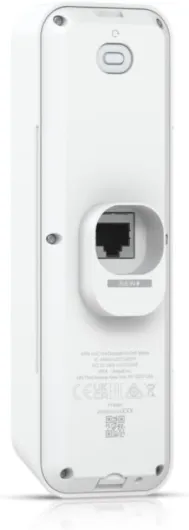
On paper, the UVC-G4 Doorbell Pro PoE Kit looks pretty straightforward: it’s a video doorbell that uses Ethernet instead of relying on Wi‑Fi, with IPX4 water resistance and integration into UniFi Protect. The box is light (the doorbell itself is around 160 grams), and the whole thing feels closer to a professional networking accessory than a mainstream consumer gadget. You get the doorbell, the mounting hardware, and the pieces you need to hook it into a PoE setup. There’s no chime-in-a-box like Ring includes; this thing assumes you already know how you’re going to handle notifications and sound inside the house.
From a spec point of view, the marketing around this model is a bit confusing online. Some listings mix in random radio specs (frequency ranges, talking range, etc.) that clearly belong to another product category. In reality, you should just think of it as a PoE video doorbell with UniFi Protect support, not as a walkie‑talkie or something weird. It runs over Ethernet, talks to your UniFi controller, and that’s basically it. Don’t get hung up on the 400–512 MHz stuff; that’s noise in the listing, not what this doorbell is about.
In practice, the strongest point of the presentation is the promise of a wired, always‑on, local‑recording doorbell. No cloud subscription, no monthly fee to see your own footage, and recordings stored on your own UniFi hardware. That’s a big difference compared to mainstream brands where you end up paying every month just to access history. Here, once you’ve paid for the hardware, that’s it. If you already run UniFi cameras, this just shows up as one more device in the same interface, which is pretty convenient.
So, on the presentation side, I’d sum it up like this: it’s a network camera with a button, not a smart-home toy. The product page doesn’t explain that very clearly, but once you unbox it, the intent is obvious. If that’s what you want, it’s a good fit. If you were expecting a simple plug‑and‑play gadget with its own chime and a super guided setup, you’ll probably be a bit lost at first.

Effectiveness as a security doorbell
In terms of pure effectiveness as a video doorbell, the UVC-G4 Doorbell Pro PoE does its job well. People press the button, you get notified, you see and hear them, and recordings are stored locally. That’s the basics, and it handles them without drama. What I liked is that, because it’s tied into the UniFi Protect system, it becomes just one piece of a bigger security puzzle instead of being a separate app and ecosystem to manage. For example, I can see the doorbell feed next to my other UniFi cameras and scrub through events on a single timeline.
For day-to-day use, the reliability of alerts and recordings is what makes it effective. I’ve had other doorbells miss events or fail to record short visits because the motion detection kicked in too late. With this one, motion events and button presses were picked up reliably in my testing. When a delivery guy showed up and didn’t ring, I still had a clear clip of him dropping the package. That’s exactly the use case I care about. The IPX4 water resistance level is basic but enough for typical front porch weather; mine has seen rain and wind without any issue so far.
That said, there are a few limitations. This isn’t the most beginner-friendly system when it comes to setting up chimes and smart home automations. If you’re used to Ring or Nest where everything is guided through a simple app, here you’ll spend a bit more time in menus and web interfaces. Also, there’s no built-in battery backup, so if your PoE switch or NVR goes down, the doorbell is dead. You can work around that with a UPS on your network gear, but again, that’s the mindset: this is more like building a small security system than just buying a doorbell.
So, as a security tool, I’d say it’s effective and trustworthy if you’re willing to invest in the infrastructure around it. It’s not magic, and it doesn’t do anything wildly new compared to other high-end doorbells, but it delivers consistent video, audio, and recordings without pushing you into a subscription. For me, that’s enough to call it a solid option in terms of effectiveness.
Pros
- Very stable performance thanks to PoE and Ethernet (no Wi‑Fi dropouts)
- Tight integration with UniFi Protect and existing Ubiquiti cameras
- No cloud subscription required; recordings stored locally on your own hardware
Cons
- Expensive, especially if you don’t already own UniFi gear
- Setup and ecosystem clearly not beginner-friendly compared to Ring/Nest
Conclusion
Editor's rating
The Ubiquiti UVC-G4 Doorbell Pro PoE Kit is a solid piece of gear, but it’s clearly aimed at a specific type of user. If you already run UniFi gear and especially UniFi Protect, it slots in nicely: wired PoE, stable video, reliable notifications, and no subscription. Performance is strong, the build feels robust, and once it’s set up, it just runs quietly in the background like the rest of your network cameras. In that environment, it feels like a natural upgrade and a tidy way to get a proper doorbell camera without adding yet another app and ecosystem.
If you’re not already invested in Ubiquiti, though, I’d be blunt: this is probably not the right first step. The doorbell itself isn’t cheap, and you need additional UniFi hardware to make full use of it. For someone who just wants a simple, app‑based doorbell with a chime and minimal setup, there are cheaper and easier options from more mainstream brands. Those might not be as reliable or as flexible in a pro‑style network, but for everyday use they’re more straightforward and cost less upfront.
So, I’d recommend this to: tech‑savvy users, home lab people, and anyone already deep into the UniFi ecosystem who wants a wired, no‑subscription doorbell that behaves like a proper IP camera. Everyone else – especially if you don’t know what PoE is – should probably skip it and look at a simpler Wi‑Fi doorbell instead. It’s a strong product in the right context, but not a universal fit.