
Summary
Editor's rating
Value for money: worth it in Google land, less so elsewhere
Design: clean look, but not exactly invisible
Battery life: decent, but not the strongest point
Durability and reliability: weather is fine, software is the question mark
Performance: good detection, mixed live view experience
What the Nest Doorbell actually does day to day
Pros
- Integrates very well with Google Home, Nest speakers, and smart displays
- Accurate person/animal/vehicle detection with configurable activity zones
- Easy self-install with battery power and optional wedge mount for better viewing angle
Cons
- Battery life is only average and needs recharging more often than some competitors
- Live video quality and load times can be inconsistent, especially after some updates
- Higher upfront cost than many alternatives, especially if you’re not using the Google ecosystem

Specifications
View full product page →| Brand |
A smart doorbell that actually fits into daily life
I’ve been using the Google Nest Wireless Doorbell for a while now, and I’ll be straight: it’s a pretty solid product if you’re already using Google stuff at home, but it’s not perfect. I swapped it in where I used to have a basic wired chime and, more recently, a Ring doorbell. So I’ve got some context on what’s good, what’s just marketing, and what’s a bit annoying once you live with it every day.
The main thing I wanted was to see who’s at the door when I’m not home and to talk to delivery drivers. On that front, it gets the job done. The video is clear enough, the app alerts are fast most of the time, and the two-way audio is usable. Not cinema quality, but I can tell the delivery guy where to leave a parcel without repeating myself five times, which is all I really care about.
Where it gets interesting is all the smart stuff: detection zones, person vs animal vs vehicle alerts, and integration with Google Assistant speakers and displays. When it works well, it feels pretty natural: doorbell rings, my Nest Hub shows the video, my speakers chime, my phone buzzes. After a few days you kind of forget how manual things felt before. But you also start to notice the limits: battery life, sometimes sluggish live view, and a few quirks in the app.
If you’re expecting a flawless, set-and-forget device, that’s not what this is. It’s good, but there are trade-offs. It makes the most sense if you’re already on Android, use Google Home, and maybe have Nest cameras or speakers. If you’re on Alexa or heavily invested in Ring, this is more of a sideways move than an upgrade. I’ll go through the good and the bad so you can see if it fits how you actually live, not just what’s written on the box.
Value for money: worth it in Google land, less so elsewhere
Price-wise, the Nest Doorbell sits in the higher bracket for consumer doorbells, especially at full price. Several reviewers say the same thing: it’s not cheap, and it makes more sense if you grab it during a sale. Compared to Ring, you’re generally paying a bit more up front, and Ring devices often get more aggressive discounts. So if you’re just looking at hardware cost, Nest doesn’t win.
Where it claws some of that back is on subscriptions, especially if you have multiple cameras. For one camera, Ring’s plan is usually about £1 per month cheaper than Google’s Nest Aware. But if you have several Nest cameras or plan to add more, Google’s multi-device plan can end up about £3 a month cheaper overall. Also, you do get a small amount of free history (around three hours) without paying anything, which is enough to catch missed deliveries and quick visits. With Ring, to really use all features, you’re basically pushed into a subscription from day one.
The real value depends on your ecosystem. If you already have Google speakers, Nest Hubs, or other Nest cameras, this doorbell fits in nicely and feels like part of a bigger system. In that context, the price hurts less because you’re getting a more integrated experience: doorbell rings, your speakers chime, your smart display shows the video, and you manage everything in one app. If you’re on Alexa, the story flips. Ring is better integrated, has better battery life for similar models, and usually costs less both up front and over time.
So, is it good value? I’d say it’s fair value if you’re already in the Google world and catch it on discount. At full price, and especially if you’re not using Google Assistant much, there are cheaper options that do 80–90% of the job. It’s not a rip-off, but it’s not a bargain either. You’re paying a bit extra for the Google integration and the Nest brand, and whether that’s worth it really depends on the rest of your setup at home.
Design: clean look, but not exactly invisible
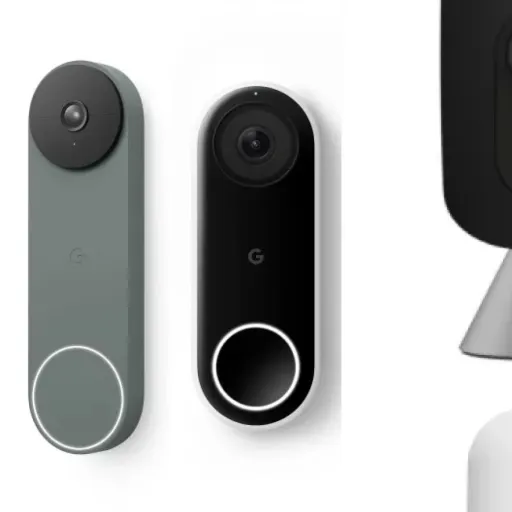
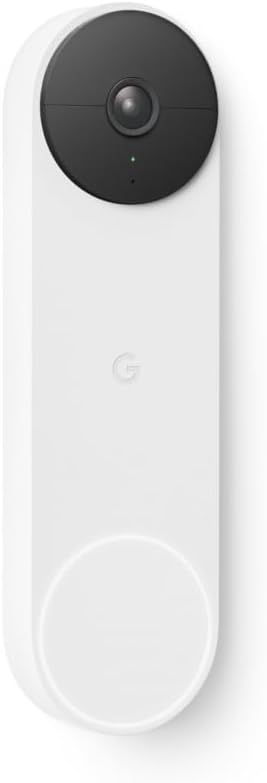
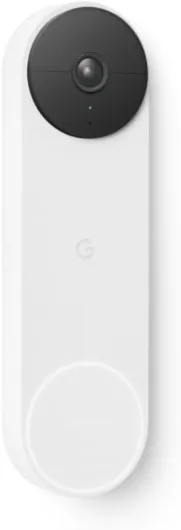
Design-wise, the Nest Doorbell is fairly simple: a tall, slim rectangle with a camera at the top and a round button at the bottom. It’s plastic, but it doesn’t feel toy-like. Mine is in the darker colour and it sits pretty flat against the wall. It doesn’t scream “big gadget” like some chunkier doorbells do, which I liked. If you care what your front door looks like, this one blends in reasonably well, especially compared to some bulkier Ring models.
The button is big enough that visitors instantly know where to press, even older folks who aren’t into tech. There’s a light ring around it when it’s active, so it’s clear it’s a doorbell and not just a random camera. At night, that light helps people spot it, though it’s not so bright that it’s annoying. The camera lens is small and fairly discreet, so it doesn’t give off a full CCTV vibe, more like a normal doorbell that just happens to have a camera stuck on top.
One thing I like is the included wedge mount. My door is in a slightly recessed area and faces sideways to the path, so a straight-on mount would mostly show the wall. With the wedge, I could angle the camera towards the path and the street so it actually sees people walking up. The mounting template and plate are simple, and the doorbell locks into place with a small tool. It’s not ultra-secure against someone determined to steal it, but it’s solid enough for normal use.
In terms of size, it’s not tiny, but it’s slimmer than a lot of the competition. It’s about 160 mm tall and under 5 cm wide, so it should fit next to most door frames without looking ridiculous. If you live in a flat with a narrow frame, measure first, but it’s probably fine. Overall, the design is sensible: nothing flashy, nothing fancy, just a fairly neat unit that looks modern without trying too hard. If you hate chunky plastic tech on your front door, this is at least on the more discreet side of the market.
Battery life: decent, but not the strongest point
The Nest Doorbell runs on a built-in battery by default, and that’s both handy and slightly annoying. Handy because you can install it almost anywhere without touching existing wiring. Annoying because, yes, you will be taking it off the wall to recharge it every so often. How often depends heavily on how busy your front door is and how you set the video and detection settings.
In a fairly active area, with motion detection on and a few visits per day, I’m seeing closer to what other users report: around three to four weeks per charge. One reviewer mentioned charging every three weeks compared to every five or six with Ring, and that matches my experience. If you live on a quiet street and tweak it for battery saving (shorter clips, fewer detection types, less frequent events), you can stretch it longer, but you’re not getting several months like some low-power cameras on the market.
Charging itself is straightforward but not instant. You pop the doorbell off its mount with the included tool, bring it inside, and plug it in via USB. A full charge can take a few hours, so it’s smarter to top it up before it completely dies. One user said they just charge it weekly to keep it simple, but that’s overkill unless your place is really busy. I usually wait until it drops below 20–25% and then charge it overnight. Removing and reattaching it is easy enough that it doesn’t feel like a big job, more like charging a big power bank.
If you don’t want to deal with charging at all, you can wire it into existing doorbell wires, but that assumes your house actually has them in the right place. Mine doesn’t, so I’m stuck on battery. Overall, I’d call the battery life “fine but not impressive”. It’s good enough that it’s not a daily annoyance, but compared to Ring’s similar models, Nest seems to need charging more often. If long battery life is your main priority, this probably won’t be your favourite part of the product.

Durability and reliability: weather is fine, software is the question mark
The hardware itself feels okay for the price. It’s plastic, but not flimsy, and the IP54 rating means it handles rain, dust, and general outdoor conditions without falling apart. Mine has sat through some pretty rough weather – heavy rain and a couple of cold nights – and it hasn’t shown any obvious physical issues. The button still clicks properly, the lens hasn’t fogged up, and the mount hasn’t loosened. So on the physical side, I’m not worried.
The weak point is more on the software and long-term reliability side. A few long-term users on Amazon mention that the device worked well initially and then gradually got worse with updates, especially around live view quality and connection reliability. One review in particular is brutal: after 9 to 16 months, they say the live view fails almost all the time, and even with a top-notch internet setup, Google support keeps blaming the network. I’m not seeing that extreme level of failure, but I have noticed that performance and image quality don’t always match what the hardware could probably do.
The good news is that Google does push firmware and app updates, so bugs don’t stay forever. The bad news is that those same updates can sometimes introduce new issues or tweak settings without really telling you. The product description even says “please update firmware before use”, which is already a hint that out-of-the-box software isn’t always up to date. If you’re the kind of person who hates fiddling with updates and troubleshooting, that might annoy you over time.
As for longevity, the 2-year manufacturer warranty is standard and at least gives some peace of mind. I don’t see the hardware failing quickly under normal conditions, but I do think the experience you get will depend a lot on how Google handles their cloud and app over the next few years. If they keep optimising it, you’re fine. If they decide to cut corners on streaming quality or push more aggressively towards subscriptions, the doorbell you buy today might feel a bit different in a year. So I’d say: hardware durability is good, long-term software reliability is more of a question mark.
Performance: good detection, mixed live view experience
In daily use, performance is mostly solid, with a few annoying dips. Motion detection is actually one of the stronger points. It picks up people walking up to the door reliably, and the difference between people, animals, and vehicles is usually accurate. I had a few false positives from shadows and branches early on, but once I tweaked the activity zones, that calmed down a lot. If you set a tight zone around your path and doorstep, it stops buzzing every time a car passes.
Alerts on the phone are reasonably fast. When someone presses the button, my Android phone rings within a couple of seconds and I can jump into the live view. The speakers in the house also chime and the Nest Hub shows the video. For visitors, it feels like a normal doorbell with extra steps on my side. The delay is there, but it’s short enough that it doesn’t feel awkward. For motion-only events, sometimes the alert comes after the person has already walked away, but you can still check the recording.
Where I’ve seen more mixed results is the live video quality and load times. The camera is 960p, and in good daylight, faces are clear and you can easily tell who’s who at a normal distance. But if you’re hoping to zoom in on small details, like a license plate a few metres away, you’ll probably be disappointed. A few users online also complain that Google seems to have dialed down the stream quality with updates, and honestly, I noticed that the stream sometimes looks softer than I’d expect even with good Wi‑Fi. Recordings are usually a bit sharper than the live feed, but still not security-camera-grade if you need fine detail.
Stability-wise, I’ve had some hiccups. Most days it’s fine, but every now and then the live view takes ages to load or just fails once and then works on the second try. This lines up with some of the more negative reviews where people say the app has become less reliable over time. To be fair, I’m not seeing it fail 99% of the time like that one angry review, but it’s also not bulletproof. If you’re a network nerd with fast fibre and perfect Wi‑Fi, you might get frustrated that the bottleneck seems to be on Google’s side, not yours. For normal home use, it’s acceptable, but there’s room for improvement.

What the Nest Doorbell actually does day to day
On paper, the Google Nest Doorbell Wireless is a battery-powered video doorbell that connects over Wi‑Fi and talks to the Google Home app. In practice, it’s your front-door camera, intercom, and notification system all rolled into one little plastic rectangle. It records in 960p at 30 fps, which isn’t full HD, but honestly for a doorbell it’s fine for faces and general movement. Just don’t expect to zoom in and read a license plate from across the street.
The main functions I use daily are: motion alerts, doorbell press alerts, and quickly jumping into the live view from my phone. The camera can tell the difference between people, animals, and vehicles, and you can turn these categories on or off. That’s handy if you live on a busy street and don’t want your phone buzzing every time a car goes past. You also get about three hours of free video history, so if you miss a notification, you can scroll back a bit to see what happened without paying a subscription. If you want longer history, then you’re in Nest Aware territory with a monthly fee.
What I liked is how it hooks into the rest of the Google ecosystem. When someone presses the button, my Google speakers chime and my Nest Hub shows the video automatically. I can answer from my phone or from the display and talk to the person at the door. If I’m not home, I can still answer like a normal call. There are also pre-recorded quick responses you can trigger, like asking a courier to leave the parcel, which is handy when you’re in a meeting and don’t want to talk.
There are some caveats though. The app experience depends heavily on your connection and, frankly, Google’s servers. Most of the time it’s quick, but there are times when loading the live view feels slower than it should, or recordings take a while to appear. Also, the product really makes the most sense if you use Google Assistant. It technically works with Amazon Alexa, but if you’re fully on Alexa, Ring is just better integrated and usually cheaper. So the Nest Doorbell is basically built for people who already live in Google’s world and want a doorbell that fits into that setup without messing around.
Pros
- Integrates very well with Google Home, Nest speakers, and smart displays
- Accurate person/animal/vehicle detection with configurable activity zones
- Easy self-install with battery power and optional wedge mount for better viewing angle
Cons
- Battery life is only average and needs recharging more often than some competitors
- Live video quality and load times can be inconsistent, especially after some updates
- Higher upfront cost than many alternatives, especially if you’re not using the Google ecosystem
Conclusion
Editor's rating
Overall, the Google Nest Wireless Doorbell is a solid, practical option if you’re already using Google Home and Android. It covers the basics well: clear enough video, reliable motion and person detection, two-way audio that’s actually usable, and tight integration with Google speakers and smart displays. For everyday stuff like talking to delivery drivers, checking who rang while you were out, and keeping an eye on the front door, it gets the job done without much drama once it’s set up.
It’s not perfect though. Battery life is only decent, not great, especially compared to similar Ring models. You’ll probably be charging it every three to four weeks in a busy environment. The live video quality and speed can also be hit and miss, and some long-term users report the experience getting worse after firmware updates. Add to that a higher price tag, and it becomes harder to recommend if you’re not already in the Google ecosystem.
If you live in “Google land” – Android phone, Google Home app, Nest speakers or displays – this doorbell makes sense and feels like a natural extension of what you already have. If you’re deep into Alexa or just want the cheapest, longest-lasting battery doorbell, I’d look harder at Ring or other brands. For me, it’s a good, functional product with a few rough edges, not a miracle gadget. Buy it for the integration and convenience, not because you expect flawless performance in every situation.